A solar inverter that keeps beeping, flashing a warning light or displaying an error code is telling you that something needs attention. It may be a warning about low battery, overload, temperature or an input problem. It can also indicate a fault that should be checked by a qualified solar technician.
Do not assume every beep means the inverter is damaged. Some models beep briefly when switching on, switching off or when you press a button. The meaning of a continuous alarm, intermittent beep or red fault light depends on the inverter brand, model and firmware. The safest first step is to record the exact message or code and check the manual for that model.
This guide explains what to check when a solar inverter starts beeping in a Nigerian home, how to recognise common warning categories, and when to stop troubleshooting and call an installer. It does not treat error numbers from different brands as interchangeable.
First: is the beep normal or an alarm?
Listen to the pattern and watch the display. A short beep when you press a button or switch the inverter on may be normal. Repeated intermittent beeps may indicate a warning, while continuous beeping may indicate a fault on some models. These are examples, not a universal rule.
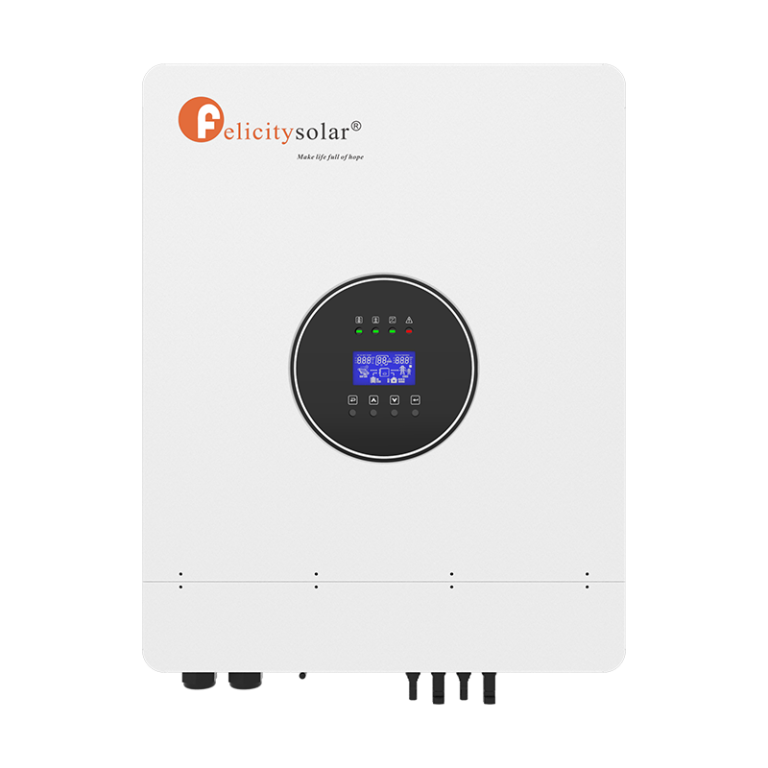
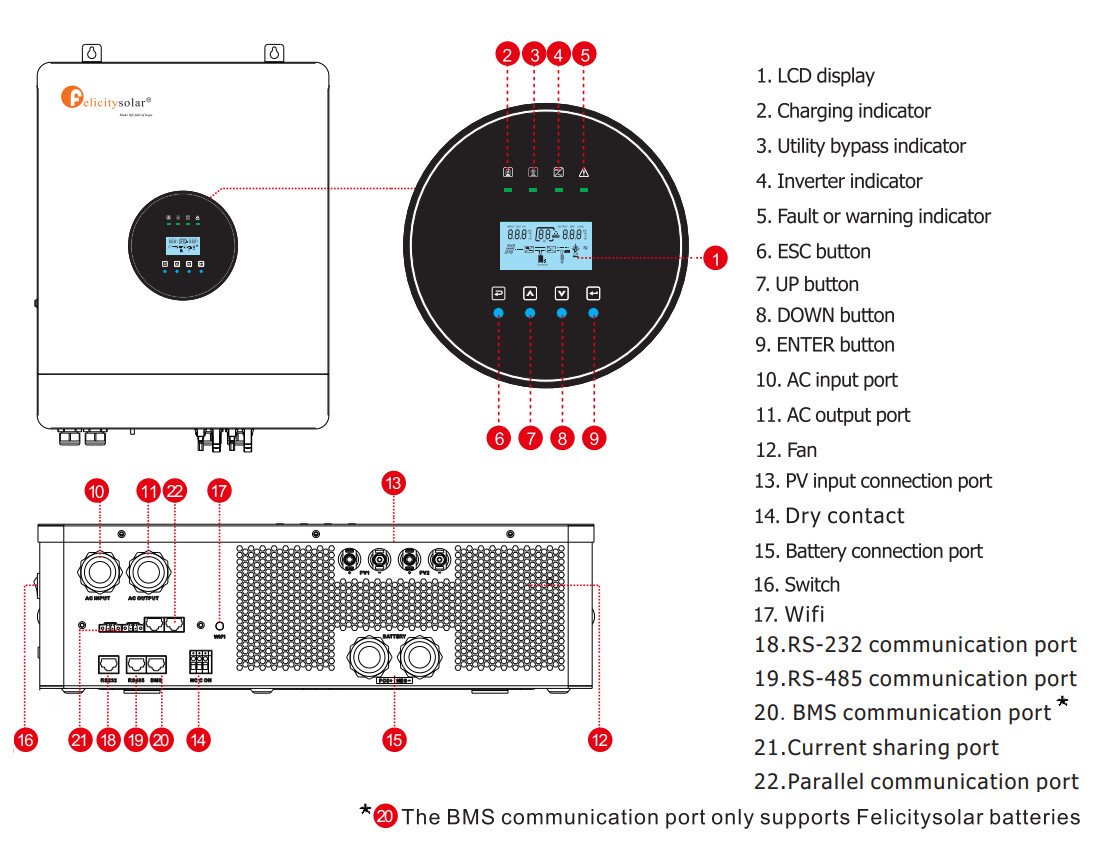
For example, Felicity Solar’s IVEM8048 user guide says its buzzer sounds for about 2.5 seconds when the inverter is turned on or off and about 0.1 seconds when a button is pressed. It describes continuous beeping for a fault event and discontinuous beeping for a warning event. Your model may behave differently. Check the Felicity IVEM8048 official user guide.
| What you notice | What it may mean | What to do first |
|---|---|---|
| One short beep when pressing a button | Normal button feedback on some models | Check whether a warning icon or code is also displayed |
| Brief beep during start-up or shutdown | Normal operating feedback on some models | Confirm the inverter completes its normal start-up and shows no fault |
| Intermittent beeping with a flashing warning light | A warning condition, such as low battery or another monitored condition | Read the warning code and check the exact model manual |
| Continuous beeping with a steady fault light | A fault that may stop normal operation | Reduce risk, record the code and contact an installer if the manual does not give a safe user check |
| Beeping with no readable code | Display, communication or internal fault, or a warning not visible on the main screen | Photograph the display and note the sound pattern before contacting support |
What to do immediately when your inverter starts beeping
- Look for danger first. If you see smoke, sparks, melted insulation, swelling, leaking, hear crackling or smell burning, keep away from the equipment. Do not touch it or attempt a restart. Move people away and contact emergency services or a qualified electrical professional as appropriate.
- Record the exact code or message. Photograph the full screen, including letters, numbers and warning symbols. A code such as F01 is not enough by itself; record the brand and complete model number too.
- Note the operating conditions. Was the inverter running on battery, grid or solar? Did the beeping start when a fridge, pump, iron or other appliance switched on? Did it happen after a power cut or during charging?
- Check the external load safely. If there is no sign of damage and the manual allows it, switch off non-essential appliances using their normal switches. Do not open the inverter or distribution board.
- Check visible status indicators. Note whether the battery, grid/utility, solar/PV and fault lights are on, flashing or off. Do not remove covers to inspect wiring.
- Find the manual for the exact model. Use the model sticker or the original paperwork. Do not use a code list for a different inverter just because the casing looks similar.
Common reasons a solar inverter beeps
Model-specific examples from the Felicity IVEM8048 user guide: The following codes are for this inverter model only. They are not a general Felicity code list and must not be applied to other Felicity models without checking their manuals.
| IVEM8048 warning code | Meaning in the official manual | Safe first response |
|---|---|---|
| 01 | Fan is locked | Keep the external ventilation area clear and arrange an installer inspection. Do not open the case or handle fan wiring. |
| 02 | Overload | If there is no sign of damage, switch off non-essential appliances using their normal switches and follow the exact manual’s recovery instructions. |
| 03 | Low battery | Reduce optional loads and allow charging from an approved source. If it returns unusually early, have battery capacity and charging checked. |
| 50 | BMS firmware version mismatch | Do not attempt a firmware update yourself. Ask the installer or battery/inverter support to confirm compatible firmware versions. |
| 51 | BMS does not allow the inverter to charge the battery | Check the battery’s normal status display or app, if available, and ask the installer to identify why charging is inhibited. |
| 52 | BMS does not allow the inverter to discharge the battery | Reduce reliance on battery backup and arrange an installer check of the battery protection status and configuration. |
| 53 | BMS requests that the inverter charge the battery | Check whether an approved charging source is available and follow the battery manufacturer’s charging guidance. |
| 54–65 | The BMS has detected an issue; the manual does not give a separate plain-language description for each code in this range | Record the exact number and contact the installer if it persists. Do not change battery protocols or protection settings. |
The IVEM8048 manual also lists separate fault codes. A warning code and a fault code are not necessarily the same type of event. Use the full manual’s warning and fault tables, and contact Felicity or the installer if the condition persists. Open the official Felicity IVEM8048 user guide.
1. Battery voltage is low
If the battery has been supplying the home during a long outage, it may have reached the inverter’s low-voltage warning point. The inverter may beep to alert you before it disconnects the load to protect the battery. This can happen when the battery is undersized, already aged, not fully charged or carrying more appliances than usual.
Check the battery level or voltage on the normal display and note whether the inverter is charging from grid or solar. Switch off non-essential loads using their normal switches if the system is otherwise safe. Do not keep restarting the inverter to force it to run on a depleted battery, and do not lower the low-voltage cut-off without the battery manufacturer’s instructions.
If your battery backup has recently become much shorter, see our guide to why an inverter battery drains fast and how to diagnose it.
2. The connected appliances are overloading the inverter
An overload warning may appear when the connected appliances demand more power than the inverter can supply. An electric iron, kettle, microwave, water pump, freezer or air conditioner can push a small system beyond its limit. Motor-driven appliances can also draw a higher starting current than their normal running demand.
Check the load percentage or watts on the display if available. If the system is safe, switch off non-essential appliances using their ordinary switches and see whether the warning clears according to the manual. Do not repeatedly reset an overload fault without finding the cause. If the alarm returns with a normal load, ask an installer to check the inverter rating, appliance startup demand and output circuit. If you are planning a larger system or replacing an undersized inverter, see our solar inverter setup and sizing guide for Nigerian homes.
3. The inverter is overheating
High temperature can trigger a warning or shutdown. Possible contributors include blocked ventilation, direct sun, a hot enclosed installation space, dust build-up or an internal fan problem. The exact warning code and permitted user maintenance vary by model.
From outside the unit, check whether ventilation openings are visibly blocked and whether stored items are restricting airflow. Keep the area clear. Do not insert tools into vents, remove covers or spray liquid or compressed air into the inverter. If the casing is unusually hot, the fan sounds abnormal or the temperature warning returns, stop using it and contact an installer.
4. Grid or generator input is outside the inverter’s accepted range
Some hybrid inverters warn when the incoming utility or generator voltage or frequency is outside the configured operating range. This may happen when public supply is unstable or a generator is not producing suitable output. The inverter may reject the input and continue supplying the load from battery, depending on its settings.
Check whether the display shows an AC input voltage or frequency warning and whether the utility indicator has changed. Do not open the changeover switch, adjust internal settings or alter generator wiring. Ask the installer to measure the input and verify the inverter’s approved voltage and frequency range.
5. Solar PV input or panel wiring fault
A PV warning can relate to abnormal solar input, a disconnected string, polarity or insulation issue, a protective device or a solar input outside the inverter’s permitted range. Rain, damaged cables, a loose connector or a fault in the PV circuit may also need professional inspection.
Look only at the normal display for PV voltage or power and note any warning. Do not unplug MC4 connectors, touch solar cables or attempt to measure panel voltage. Solar panels can produce dangerous DC voltage in daylight, even when the inverter is switched off. Leave PV isolators and wiring checks to a qualified solar technician.
For a battery that is not charging from solar or grid, use our separate guide: solar inverter not charging the battery.
6. Lithium battery communication or BMS protection
When a lithium battery is connected to a hybrid inverter, the two devices may exchange battery status and limits through a supported CAN or RS485 connection. If communication is interrupted, the inverter may display a battery communication warning. A battery management system may also stop charging or discharging when it detects a condition outside its protection limits.
Check the battery’s normal status lights or app, if available, and record any warning shown on both devices. Do not unplug communication cables, change DIP switches or select a different lithium protocol unless the exact battery and inverter manuals instruct the installer to do so. Compatibility and pinout can vary between brands and models.
7. A genuine internal or electrical fault
Some alarms indicate a short circuit, insulation fault, earth fault, overcurrent, relay problem or internal hardware issue. These are not ordinary settings problems. If the code points to a wiring, insulation, protection or internal fault, stop troubleshooting beyond recording the code and arranging professional support.
For example, Deye’s official manual for its SUN-(30–36)K-G04 family lists F01 as a DC input polarity reverse fault and F02 as a DC insulation impedance fault. This is a 30–36kW three-phase grid-connected inverter family, not a typical small home hybrid inverter. The example is included to show why model identification matters; those definitions must not be copied onto another brand or Deye model without checking its manual. See the official Deye SUN-(30–36)K-G04 manual.
Why you should not use a universal inverter error-code chart
There is no reliable universal list where Error 01, Error 04 or Error 07 means the same thing on every solar inverter. The meaning can change between brands, product families, firmware versions and even similar-looking models.
Growatt’s MID 11–30KTL3-XH manual lists Warning 200 as “PV panel disconnected” and Warning 301 as grid voltage out of range. It also lists Warning 400 for fan function abnormal, Warning 407 for over-temperature and Warning 500 for battery-management-system communication failure. Those are codes for that exact product family. Deye uses F-codes on the SUN-G04 family cited above. Felicity’s IVEM8048 guide has its own warning-code table and buzzer descriptions. These are different systems, not interchangeable code dictionaries. Growatt MID 11–30KTL3-XH official manual.
| Brand / manual family | Example from that manual | Important limitation |
|---|---|---|
| Felicity IVEM8048 | Different buzzer behaviour for warning and fault events | Use its warning table only for supported IVEM8048 models and manual revision |
| Deye SUN-(30–36)K-G04 | F01: DC input polarity reverse; F02: DC insulation impedance fault | Do not assume these F-code meanings apply to all Deye hybrid or off-grid models |
| Growatt MID 11–30KTL3-XH | Warning 200: PV panel disconnected | Do not apply this warning number to another Growatt product family |
When you search for a manual, match the complete model code on the inverter label, not just the brand name or advertised kVA rating. If you cannot identify the model, send the installer a clear photo of the model sticker and display.
Can you mute the inverter beeping?
Some inverters have a mute or buzzer setting. Muting may make the sound stop, but it does not repair the condition that triggered the alarm. On some models, the mute icon only confirms that the alarm sound has been disabled; the warning or fault can remain on the display.
Only use the mute option if the exact manual describes it and you have recorded and understood the warning. Do not mute a fault and leave the system unattended. If the inverter is beeping continuously or the cause is unclear, contact the installer rather than treating silence as a fix.
When should you call a solar technician?
Call a qualified installer or the manufacturer’s support team if:
- The same warning or fault returns after the permitted basic check in the manual.
- The inverter reports short circuit, insulation, earth leakage, overcurrent or internal hardware failure.
- The battery BMS repeatedly disconnects or reports a protection event.
- The unit becomes unusually hot, its fan stops or it makes crackling noises.
- You notice damaged cables, melted insulation, sparks, smoke, swelling or leaking.
- You cannot identify the code or find the manual for the exact model.
Give the technician the inverter brand and full model number, the displayed code, a photo or video of the screen, the beep pattern, battery type, and whether the fault appears on grid, solar or battery. This information can save time during diagnosis.
Frequently asked questions
Why does my solar inverter keep beeping even when there is light?
Daylight alone does not mean the battery is charged or that the solar input is working correctly. The inverter may be warning about low battery, overload, PV input, temperature or another fault. Read the displayed code and check the exact model manual.
Why does my inverter beep when NEPA takes light?
Some inverters make a sound when changing from utility bypass to battery mode. A brief transition beep may be normal for that model. Repeated beeping or a fault indicator needs a separate check.
Why is my inverter beeping and showing a red light?
A red or flashing fault indicator can signal a warning or fault, depending on the model. Record the code and check the manual’s indicator description. Do not rely on the colour alone.
Can low battery make an inverter beep?
Yes. Many inverter systems warn when battery voltage or state of charge reaches a configured threshold. Reduce non-essential loads if safe, allow charging, and investigate if the warning occurs unusually early.
Should I switch off an inverter that keeps beeping?
Follow the shutdown instructions in the exact manual. If there is smoke, burning smell, unusual heat, sparks or damaged wiring, keep away and seek urgent professional help. Do not operate switches or disconnect cables if doing so would bring you near a hazard.
Can I reset my inverter to clear an error code?
Do not perform a factory reset or repeated power cycle just to clear an alarm. Some codes require inspection, and a reset can erase settings or hide useful diagnostic information. Follow only the model-specific procedure in the manual or the installer’s instructions.
Why does my inverter beep continuously after changing the battery?
The new battery may have a different chemistry, voltage, charging profile or communication requirement. The inverter settings or BMS communication may not match the replacement battery. Ask the installer to verify compatibility and configuration against both manuals.
Official manuals and support references
- Felicity Solar IVEM8048 User Guide
- Deye SUN-(30–36)K-G04 User Manual
- Growatt MID 11–30KTL3-XH User Manual
- Felicity Solar official downloads page — search by exact model

Oladepo Babatunde (also known as Prince Babatee Tunde) is a Computer Scientist, researcher, professional content writer and SEO content strategist with more than eight years of experience. He holds a Higher National Diploma (HND) in Computer Science from Kwara State Polytechnic, Nigeria, and is based in Ilorin, Kwara State. As a freelance writer, he creates research-led, practical content on technology, Nigerian internet services, AI tools, gadgets and solar power. His work combines research, source checking, technical understanding and SEO strategy. Where an article includes hands-on testing, the product, method and relevant conditions are described in the article; research-based guides are identified as such.