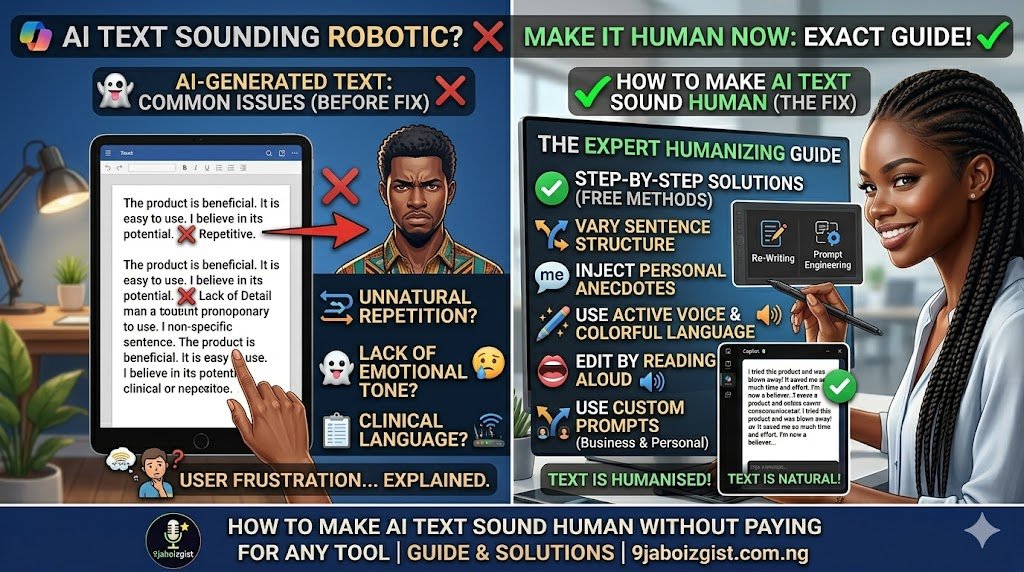
You used AI to write something. The output came back grammatically correct, logically organized, and completely inoffensive. It also sounds like it was written by a system that has read every document ever published and retained none of the personality from any of them.
That is the problem with AI writing in its default form. It is not wrong. It is just not quite alive. And if you need it for a blog post, an email, an essay, or a client deliverable, “technically correct but obviously robotic” is not good enough.
The good news is that this is fixable, and you do not need to pay for a humanizing tool to do it. Most paid humanizers apply surface-level word swaps that produce text which reads just as unnaturally as the original, only with different word choices. The actual fixes are deeper than that, they are free to apply, and they start with understanding exactly why AI writes the way it does.
Why AI Writing Sounds the Way It Does
Before any editing makes sense, you need to understand what you are actually working with. AI writing tools like ChatGPT, Claude, and Gemini generate text by predicting the most statistically likely next word based on patterns absorbed from billions of documents. The model is not trying to express a thought. It is trying to produce the most expected response to the prompt you gave it.
That optimization for plausibility over authenticity produces very specific, recognizable patterns.
Sentence lengths cluster in a narrow medium range. Almost no sentence is very short, and almost no sentence is unusually long. The rhythm is uniform in a way that feels slightly airless when read closely. Transition phrases appear constantly because they appear constantly in formal written text. Words like “furthermore,” “it is important to note,” and “in conclusion” are statistically common in the kind of writing AI was trained on, so they show up disproportionately in AI output.
The tone is formal and hedging by default. AI avoids strong opinions because training data that takes clear positions is noisier and less predictable than balanced, measured writing. Paragraphs tend to be symmetric in length. Specific personal detail and genuine experience are absent because the model has none.
None of these are bugs. They are what the model was designed to do. But they are also the specific things you need to change, and understanding them makes every edit you apply feel logical rather than guesswork.
How AI Detectors Identify AI Writing: Two Concepts Worth Knowing
If you need your text to pass an AI detection tool, you need to understand what those tools are actually measuring. The two core concepts are perplexity and burstiness, and once you understand them in plain terms, you will know exactly what to target in your edits.
Perplexity measures how predictable the word choices are. A human writer might use an unexpected turn of phrase, choose a slightly unusual synonym, or structure a sentence in a way that is grammatically fine but not statistically common. AI writing is low-perplexity: everything is the most expected option at every step. Tools like GPTZero measure this pattern and use it as a signal.
Burstiness measures how much sentence length varies. If you look at any piece of genuine human writing, the sentence lengths jump around substantially. A sentence might be five words. Then fifteen. Then a long, flowing thirty-word sentence that carries a complex idea with several supporting clauses. Then another short one for impact. AI writing has low burstiness: the sentences cluster in a narrow range because uniform medium-length sentences are statistically common in the training data.
To pass AI detection and, more importantly, to genuinely produce better writing, you need to increase both perplexity and burstiness. More unexpected word choices, more variation in sentence length. Everything that follows in this guide addresses one or both of those targets.
Fix It Before You Generate: Prompts That Produce More Human Output
Most people treat AI text humanization as entirely a post-generation editing problem. That is the harder approach. The prompt you give the AI is the most powerful lever you have, and a well-crafted prompt can dramatically reduce how much editing the output needs.
Here is the fundamental issue: when you ask ChatGPT to “write a blog post about X,” it defaults to its most statistically average interpretation of what a blog post looks like. That default is polished, generic, and robotic. The fix is to override those defaults at the prompt level.
Give the model a specific persona. Instead of asking it to write a blog post, tell it to write as someone specific: “Write this as an experienced freelance marketer who has strong opinions based on real client experience. Use first person. Be direct.” A specific persona pulls the model away from generic and toward voice.
Specify tone with precise instructions. “Write in a conversational tone. Use contractions throughout. Keep some sentences under eight words. Avoid sounding like a press release.” This gives the model specific stylistic targets rather than leaving it to choose its defaults.
Show it how you write. Paste one or two paragraphs of your own writing and tell it: “Match this writing style closely. Use similar sentence lengths, the same level of formality, and the same kind of phrasing.” This technique is covered in depth in the guide on how to make ChatGPT remember your writing style, which is worth reading if you want this to work consistently across sessions.
Tell it exactly what to avoid. Including a list of words and phrases to exclude in your prompt is one of the most effective humanizing instructions you can give. “Do not use the words ‘furthermore,’ ‘leverage,’ ‘delve,’ ‘robust,’ ‘utilize,’ or ‘it is important to note.’ Do not use passive voice.” This forces the model to find alternatives and breaks its default patterns immediately.
Ask for imperfection. “Occasionally start a sentence with ‘And’ or ‘But.’ Include one rhetorical question somewhere in the piece. Do not make every paragraph exactly the same length.” These small permissions produce meaningfully more human-sounding structure.
Even with all of these instructions, some post-generation editing is still necessary. But a well-prompted first draft takes half the editing time that a default prompt requires.
The AI Word List: Replace These Phrases and Your Text Instantly Sounds More Natural
There is a specific set of words and phrases that appear disproportionately in AI-generated text because they are disproportionately common in the formal written sources that AI models were trained on. Removing them is the fastest single change you can make.
Here is a practical reference for the most common offenders and their natural replacements:
| What AI Writes | What Humans Actually Say |
|---|---|
| “It is important to note that” | Just say the thing directly. Delete the phrase entirely. |
| “Furthermore” | “Also,” “On top of that,” or start a new paragraph |
| “In conclusion” | “So,” “The bottom line is,” or just make the final point |
| “Delve into” | “Explore,” “look at,” “dig into,” “get into” |
| “Leverage” (as a verb) | “Use,” “apply,” “take advantage of” |
| “Robust” | “Strong,” “solid,” “reliable,” or be specific about what makes it strong |
| “Utilize” | “Use” — always |
| “Comprehensive” | “Full,” “complete,” “thorough,” or just describe what it covers |
| “Multifaceted” | Describe the actual facets instead |
| “It is worth noting” | Delete it or explain why it matters |
| “In today’s fast-paced world” | Delete entirely. Start with the actual point. |
| “Navigating” used as a metaphor | Describe the actual challenge specifically |
| “Seamlessly” | Describe how it actually works |
| “Cutting-edge” | Name the specific innovation |
| “Game-changer” | Explain specifically what changes |
Run a simple find-and-replace search for these terms in any document editor. Each replacement is an opportunity to be more specific and more direct, which is always better writing regardless of whether AI detection is a concern.
Sentence Rhythm: The Editing Change That Makes the Biggest Difference
Fixing sentence length variation is the single most impactful structural change you can make to AI-generated text. It directly addresses the burstiness problem that detectors measure, and it also makes writing genuinely more pleasant to read.
Here is a quick diagnostic. Copy your AI text into any word processor. Look at the sentence lengths. If almost every sentence is between fifteen and twenty-five words, you are looking at classic AI burstiness. The fix is intentional variation.
Add short sentences deliberately. After a longer explanation or a complex idea, follow it with a short punchy statement. “That is the point.” Or “It really is that simple.” Or just a single observation in under eight words. Short sentences create rhythm and emphasis that uniform medium-length sentences cannot.
Break long sentences at the conjunction. Anywhere you see a sentence joined by “which,” “that,” or “while,” consider splitting it into two sentences. The resulting shorter sentences often read more clearly and feel less constructed.
Start some sentences with conjunctions. Beginning a sentence with “And,” “But,” or “So” is grammatically acceptable in conversational and informal writing and almost never appears in AI output. Using it occasionally is a subtle but effective humanizing signal.
Vary paragraph length. AI paragraphs tend to be three or four sentences of similar length. Add a one-sentence paragraph occasionally. It creates visual and rhythmic variety that makes the page feel less uniform.
Use a rhetorical question. Asking a question the reader is already thinking creates engagement and is a staple of human writing that AI avoids almost entirely. “Does that mean you always need to do it this way? Not exactly.” That kind of back-and-forth is distinctly human.
The read-aloud test is the most reliable quality check for this kind of editing. Read the text out loud after you have made changes. If it flows naturally when spoken, it will read naturally on the page. If you stumble, slow down, or feel the rhythm is off, that section still needs work.
Adding the Elements That Make Writing Unmistakably Human
Surface-level edits get you part of the way there. The qualities that make writing feel genuinely human go a level deeper, and they are things no automated tool can inject because they require actual thought and perspective.
Be specific where AI generalizes. AI writing tends toward broad, general statements because generality is statistically safe. Human writing is full of specific numbers, named examples, real products, and concrete experiences. “This usually takes a while” becomes “This took me about forty minutes the first time.” The specificity signals that a person with actual experience wrote it. Go through your AI text and find every generalization. Replace it with the most specific version of that statement you can honestly make.
Add one genuine opinion per section. AI avoids taking positions because balanced, measured language is more predictable and therefore more statistically common. Real writers have opinions. Adding a single direct statement of what you actually think in each section transforms the tone significantly. “Honestly, this approach works better than most people expect.” “In my experience, the second method is almost always faster.” You do not need to be provocative. You just need to be direct about what you think.
Acknowledge nuance the way a human would. AI either over-hedges with formal disclaimer language or makes everything sound definite. Natural writing sits in between. Phrases like “this depends on your situation,” “it does not always work this way,” or “your results will vary based on a few factors” introduce the kind of real-world acknowledgment that makes writing feel grounded.
Use contractions throughout. This is simple but often overlooked. “It is” becomes “it’s.” “You are” becomes “you’re.” “Do not” becomes “don’t.” AI writing frequently avoids contractions because formal academic writing avoids them, and a significant portion of training data is formal. In conversational content, writing without contractions sounds unnatural immediately. A global find-and-replace for these is quick and effective.
The Complete Free Workflow From AI Draft to Human Draft
Here is a repeatable process that puts everything together. Work through it in order and you will have a human-sounding final draft without spending money on any tool.
Step one: Generate with a humanizing prompt. Use the prompt instructions from earlier in this guide. Specify persona, tone, contractions, and what to avoid. This is the single step that saves the most editing time.
Step two: Run find-and-replace on the AI word list. Go through the table from the previous section and replace every instance of the flagged phrases. Replace them with something more specific and direct, not just a synonym.
Step three: Check and fix sentence length variation. Look for clusters of similarly-sized sentences. Add short sentences. Split long ones. Add one or two rhetorical questions. Vary paragraph length.
Step four: Add one specific detail per paragraph. For every generalization you find, replace it with the most specific honest version of that statement. Specific numbers, named examples, and real context are all good replacements.
Step five: Add one opinion or personal note per section. Include one clear statement of what you actually think in each major section. Keep it honest and direct.
Step six: Convert to contractions. Do a pass through the entire document and convert formal phrasing to contracted form wherever it sounds natural to do so.
Step seven: Read aloud. Read the full text out loud from start to finish. Fix anything you stumble on, slow down for, or that sounds stilted when spoken.
Step eight: Run a free AI detector check. Use the free tier of GPTZero or Copyleaks’ free checker to identify which specific sentences or paragraphs are still being flagged. These are your remaining high-priority editing targets.
Step nine: Revisit flagged sections. Apply steps two through seven specifically to the flagged paragraphs. These sections still have the most AI-like patterns and need another focused editing pass.
The goal of the detector check in step eight is not to game the tool. It is to use the tool as a diagnostic to identify which parts of your text are still closest to AI defaults, so you know where to focus your editing effort.
Adjusting the Approach for Different Types of Content
The same core workflow applies across content types, but the priorities shift depending on what you are writing.
For blog posts and articles, voice and opinion are the top priorities. Readers of online content expect personality. First-person writing is not just acceptable here, it is expected. Be more willing to use casual phrasing, rhetorical questions, and direct statements of what you think. This is the content type where the humanization fixes have the most visible impact.
For academic essays, the focus shifts to specific evidence, natural argument flow, and the elimination of over-hedging AI language. Academic writing has its own formal conventions, but AI formal language and academic formal language are different things. The goal is to make the argument structure feel like a person reasoning through a problem, not a model averaging across sources. Check your institution’s policy on first-person before including it.
For professional emails, AI defaults to something that reads like a formal memo. Real emails are shorter, more direct, and more human. Apply contractions, cut the formulaic opening lines AI almost always generates, and make the core request or point as direct as possible. If the AI gave you five sentences, you probably need three.
For social media captions, AI output is almost always too long and too formal for any platform. Cut the length aggressively, add a specific hook in the first line, and make sure it sounds like something a real person would actually write on that platform. Instagram, LinkedIn, and X all have different voice conventions that AI homogenizes into something that does not quite fit any of them.
Frequently Asked Questions
How do I make AI-generated text sound more human?
The most effective approach combines better prompts at the generation stage with specific editing techniques afterward. Use prompts that specify tone, persona, and what phrases to avoid. Then edit for sentence length variation, replace overused AI phrases, add specific details and genuine opinions, and use contractions throughout.
Why does AI writing sound robotic?
AI writing sounds robotic because it is generated by predicting the most statistically likely next word, optimizing for plausibility rather than personality. This produces uniform sentence lengths, overuse of formal transition phrases, avoidance of opinions, and absence of specific personal detail. All of these patterns are recognizable and fixable.
Can I humanize AI text for free?
Yes. Paid humanizing tools apply surface-level word substitutions that often produce text that sounds just as unnatural as the original. Manual editing using the techniques in this guide is free and produces better results because it addresses the underlying patterns rather than swapping words.
What words and phrases make AI text obvious?
The most common AI-flagged phrases include “it is important to note,” “furthermore,” “in conclusion,” “delve into,” “leverage” used as a verb, “robust,” “utilize,” “comprehensive,” “multifaceted,” and “it is worth noting.” Replacing these with more direct, specific language is the fastest single improvement you can make.
How do AI detection tools identify AI writing?
AI detectors primarily measure two things: perplexity (how predictable the word choices are) and burstiness (how much sentence lengths vary). AI text has low perplexity because it always chooses the most statistically expected word, and low burstiness because sentence lengths cluster in a narrow range. Edits that increase both perplexity and burstiness improve human-likeness and reduce detection scores.
Does adding personal opinions make AI text harder to detect?
Yes, and more importantly it makes the text genuinely better. Personal opinions and specific details add exactly the kind of unpredictable, experience-grounded content that AI models do not generate naturally. They increase perplexity in a meaningful way and make the writing more engaging for readers at the same time.
What free tools can help with AI text detection?
GPTZero’s free tier and Copyleaks’ free checker both provide detection scores that are useful as diagnostic tools to identify which sections of your text still read most like AI output. They are worth running as step eight in the editing workflow, but they should be used as a diagnostic, not as the primary measure of quality.
Is it possible to make AI writing 100 percent undetectable?
No detection tool is perfectly accurate, and manual editing significantly reduces AI detection scores. But chasing a perfect score is the wrong goal. The right goal is producing writing that is genuinely useful, clear, and engaging for the reader. Well-edited text that achieves those qualities will also perform well on detection tools as a natural consequence.
How long does it take to manually humanize AI text?
For a typical 800 to 1,000-word piece, a thorough editing pass using the workflow in this guide takes around 20 to 40 minutes. Using a well-crafted prompt at the generation stage cuts this significantly. As you build the habit, the editing process gets faster.
Can I prompt ChatGPT to write more like a human from the start?
Yes. Specifying persona, tone, contractions, sentence length variation, and a list of phrases to avoid in your initial prompt produces substantially more human-sounding output than a basic content request. The guide on how to make ChatGPT remember your writing style covers how to make these instructions persistent across sessions.
The Goal Is Better Writing, Not Just Different Writing
Making AI text sound human is not fundamentally about avoiding detection, though the editing techniques that improve human-likeness also reduce detection scores as a side effect. The real goal is producing writing that is worth reading. Writing that has a point of view, uses language precisely, varies its rhythm, and respects the reader’s time.
AI is a genuinely useful starting point for a draft. But a draft is what it is. The editing pass that adds your voice, your specific details, your actual opinions, and your natural sentence rhythm is what turns a serviceable AI output into something that actually does the job you needed it to do.
The workflow in this guide is free, repeatable, and gets faster with practice. Start with the worst paragraph in your current AI draft, apply the word replacements and sentence variation steps, add one specific detail and one direct opinion, and read it aloud. That one paragraph will show you the entire difference in under ten minutes.
For related challenges with AI tools, the guides on why Gemini gives wrong answers and how to handle AI usage limits with Claude cover other common friction points that come up when working with AI writing tools regularly.