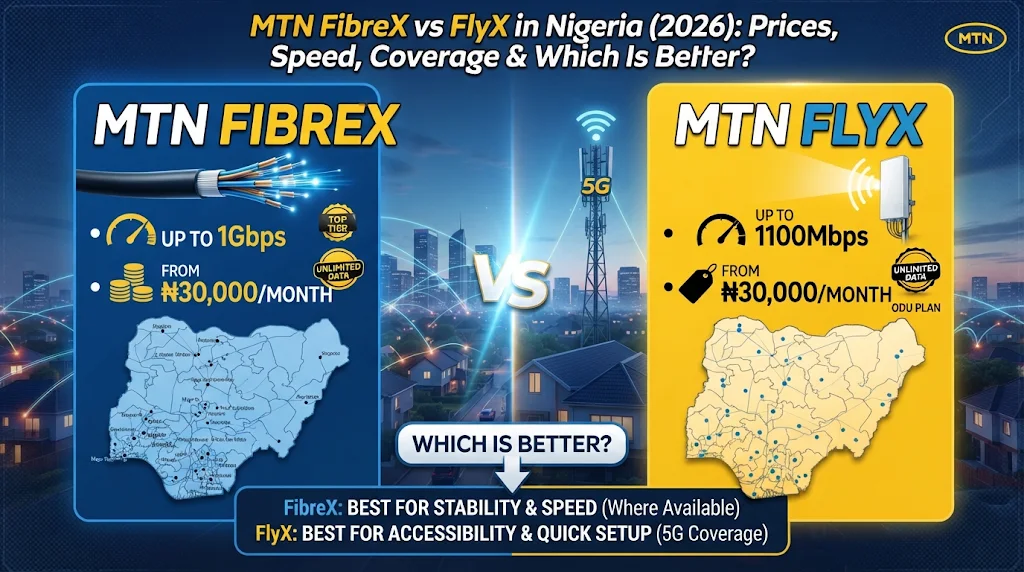
MTN FibreX and MTN FlyX are not the same internet service. FibreX brings broadband to your home through a fibre-optic cable, while FlyX uses an outdoor unit to receive MTN’s 5G network signal and an indoor unit to share the connection over Wi-Fi. Both advertise unlimited data without a fair usage policy, and their entry-level monthly prices are similar. The important difference is whether fibre reaches your building, how strong MTN’s 5G signal is at your address, and which installation and equipment arrangement suits your home.
This guide compares MTN’s published plans, equipment terms, installation, coverage and practical use cases. Prices and offer details were checked on 20 November 2026. They can change, so confirm the final price and eligibility with MTN before paying.
MTN FibreX vs FlyX: Quick Comparison
Here is the short version before we examine each service in detail. The speeds in this table are MTN’s advertised plan tiers, not measured speeds or a promise that every home will receive the full rate.
| Feature | MTN FibreX | MTN FlyX |
|---|---|---|
| Connection technology | Fibre-optic cable to the premises | Fixed wireless connection using MTN’s 5G network and an outdoor unit |
| Entry plan | 50 Mbps – ₦30,000 / 30 days | 50 Mbps renewal – ₦30,000 / 30 days |
| 100 Mbps plan | ₦45,000 / 30 days | ₦45,000 / 30 days |
| Higher advertised tiers | 200 Mbps ₦70,000; 300 Mbps ₦100,000; 1 Gbps ₦200,000 | Published renewal options currently list up to 50 Mbps and 100 Mbps |
| Data policy | MTN advertises unlimited data with no FUP | MTN advertises unlimited data with no FUP |
| Equipment | Fibre router supplied on a free-to-use basis | Outdoor and indoor units supplied on a free-to-use basis; MTN retains ownership |
| Installation | Free installation advertised; fibre must reach the premises | Free professional installation advertised; outdoor unit mounted at the premises |
| Best starting point | Check FibreX availability at your exact building | Check MTN 5G coverage and confirm service qualification at your exact address |
What Is MTN FibreX?
MTN FibreX is MTN Nigeria’s fibre-optic broadband service for homes and businesses. A fibre cable carries the connection to the premises, where customer equipment distributes internet to phones, computers, televisions and other devices. Fibre is a wired access technology: the connection does not depend on receiving a 5G radio signal at the house. You can check the current FibreX plans and prices on MTN’s website and use its address availability checker before making a decision.
MTN advertises a free-to-use fibre router, free installation and dedicated customer support. The service has its own FibreX data plans; MTN says customers cannot simply activate ordinary MTN mobile-data or broadband-router bundles on a FibreX line.
MTN FibreX plans and prices
| FibreX plan | Advertised speed | Price | Validity |
|---|---|---|---|
| Basic | 50 Mbps | ₦30,000 | 30 days |
| Standard | 100 Mbps | ₦45,000 | 30 days |
| Advanced | 200 Mbps | ₦70,000 | 30 days |
| Premium | 300 Mbps | ₦100,000 | 30 days |
| Prestige | 1 Gbps (1,000 Mbps) | ₦200,000 | 30 days |
These are the prices and tiers currently displayed on MTN’s FibreX product page. The minimum plan required when signing up is 50 Mbps, according to MTN’s FibreX help page. Check the checkout page for your address before making a budget, as promotional terms and availability can change.
Is MTN FibreX truly unlimited?
MTN says its unlimited FibreX plans have no fair usage policy and that it does not throttle speeds during peak hours. This is the provider’s published service claim, not an independent performance guarantee. Your actual experience can still be affected by faults, local network congestion, Wi-Fi interference, router placement, the server you connect to and the performance of the websites or apps you use.
What Is MTN FlyX?
MTN FlyX is a fixed wireless broadband service. Instead of bringing a fibre cable to your home, an MTN-certified installer mounts an outdoor unit (ODU) where it can receive a suitable MTN 5G signal. The outdoor unit connects to an indoor unit that provides Wi-Fi to devices in the home or small business. See MTN’s FlyX offer and renewal plans for the current package details. For a deeper breakdown of the FlyX acquisition price, renewals and equipment terms, read our MTN FlyX price and installation guide.
The outdoor placement can help when indoor mobile reception is weak, but it does not create coverage where MTN’s network is unavailable or lacks capacity. FlyX is designed for a registered installation address; MTN’s terms say the equipment must not be moved to another address without prior authorisation.
MTN FlyX plans and prices
| FlyX option | Advertised speed | Price | Validity |
|---|---|---|---|
| Acquisition offer | Up to 100 Mbps | ₦30,000 | Confirm offer validity at checkout |
| FlyX 50 renewal | Up to 50 Mbps | ₦30,000 | 30 days |
| FlyX 100 renewal | Up to 100 Mbps | ₦45,000 | 30 days |
Important: MTN’s acquisition offer advertises up to 100 Mbps for ₦30,000, while the published renewal list prices the 100 Mbps plan at ₦45,000 for 30 days. The two prices refer to different stages of the offer. Before ordering, ask MTN what subscription applies after the first payment and what speed tier will be active when you renew.
Is MTN FlyX unlimited?
MTN says FlyX plans provide unlimited data with no fair usage policy. As with FibreX, this describes MTN’s published plan terms; it should not be interpreted as a guarantee of a fixed speed at every hour or an assurance against temporary service interruptions. MTN’s FlyX terms also state that service availability depends on coverage, network capacity and technical constraints.
The Biggest Difference: Fibre Cable vs 5G Wireless
FibreX and FlyX may both connect several devices to the internet, but the connection reaches your home in different ways.
- FibreX: Data travels over a physical fibre-optic cable to your premises. Your home must be within MTN’s fibre service footprint, and an installation team must be able to connect the building.
- FlyX: Data travels over MTN’s mobile network to an outdoor receiver installed at your address. The service depends on suitable 5G coverage, signal quality and available network capacity at that location.
That is why the same neighbourhood can have different outcomes: a building may be close to a fibre route but not yet serviceable, while another building may have a suitable outdoor 5G signal. Conversely, a strong 5G signal on your phone does not prove that FlyX is available for your address, and a fibre provider’s presence on a nearby street does not guarantee a connection to your apartment.
Which Is Faster: MTN FibreX or FlyX?
On the advertised plan ceiling, FibreX has the advantage: MTN lists FibreX tiers up to 1 Gbps, while FlyX’s published renewal options currently reach up to 100 Mbps. But advertised maximum speed is not the same as the speed a particular customer will measure.
If you are comparing the 50 Mbps or 100 Mbps tiers, both services advertise the same nominal speed options at the same recurring prices. A FibreX 100 Mbps plan and a FlyX 100 Mbps plan are not guaranteed to perform identically. The result depends on the fibre connection and home network in one case, and 5G signal, cell load, outdoor-unit placement and home Wi-Fi in the other.
For a fair test after installation, connect a laptop to the router with Ethernet if possible. Run several tests at different times of day using the same device and test server. Record download speed, upload speed, latency and packet loss. Repeat over multiple days instead of choosing the best single result. If you test over Wi-Fi, stay near the router and note that Wi-Fi itself can limit the result.
Which Is Better for Gaming, Video Calls and Remote Work?
Online gaming
FibreX is generally the safer starting choice for competitive online gaming because a stable wired fibre access connection usually has lower and more consistent latency than a wireless access link. However, the route to the game server, the provider’s routing, local congestion and your Wi-Fi setup still matter. FlyX may be perfectly usable for casual gaming where its signal and network performance are good. If competitive play is important, test ping and packet loss to the actual game servers you use before choosing.
Zoom, Google Meet and remote work
Both can support video meetings and remote work when the connection is stable and upload capacity is sufficient. Do not compare only download speed. Video calls, cloud backups, sending large files and screen sharing all use upload bandwidth. Ask MTN what upload performance is typical for the plan at your address, and test it during the hours you work.
Netflix, YouTube and household streaming
Either service can handle everyday streaming when it delivers enough stable bandwidth for the number of screens in use. A 50 Mbps plan may be adequate for many households, while homes with several simultaneous 4K streams, downloads and video calls may prefer a higher tier. The quality of your Wi-Fi coverage throughout the house also matters; a fast internet plan cannot fix a weak signal in a distant room. If streaming is your main priority, see our broader comparison of internet options for streaming in Nigeria.
Which Has Better Coverage in Nigeria?
There is no reliable nationwide winner. FibreX is limited by MTN’s fibre footprint and the ability to connect the specific building. FlyX depends on MTN 5G coverage, local capacity and successful service qualification. MTN’s FlyX terms explicitly say availability is subject to network coverage, capacity and technical constraints.
Do not rely only on a general coverage map or a neighbour’s experience. Before paying, provide your full installation address to MTN and ask the provider to confirm that the exact property can be connected. For FibreX, check the official FibreX availability and ordering page. For FlyX, use the MTN coverage locator and confirm FlyX eligibility with MTN or an authorised store. Our guide to checking MTN 5G coverage in Nigeria explains why a coverage-map result is not a substitute for address-level service qualification.
Installation, Equipment and Ownership: What You Should Know
FibreX installation and router
MTN advertises free FibreX installation and a free-to-use fibre router. “Free-to-use” should not be read as proof that the customer owns the equipment. Ask MTN to show you the applicable FibreX equipment terms, including what happens if you cancel, relocate, stop subscribing or damage the equipment. MTN’s public FibreX help page confirms the router is supplied on a free-to-use basis, but the precise recovery conditions should be checked in the agreement for your order.
FlyX installation and ODU ownership
FlyX requires an MTN-certified installer to mount the outdoor unit and connect it to the indoor unit. MTN’s offer terms say it will use reasonable efforts to complete installation within 2–5 working days after successful order confirmation and payment, subject to installer availability, equipment, site readiness, weather and access conditions.
The FlyX outdoor and indoor units remain MTN property. The customer receives permission to use them for MTN broadband, not ownership. The terms restrict moving the equipment to another address without MTN’s prior authorisation. They also say MTN may retrieve the ODU if there is no active subscription for 90 days, and customers can be responsible for loss or damage caused by negligence, misuse or unauthorised relocation. Read the FlyX terms and conditions before accepting the equipment.
What Happens During a Power Outage?
Neither service works through a power outage unless the equipment has electricity. FibreX normally needs power for the fibre terminal (ONT) and Wi-Fi router. FlyX needs power for its outdoor and indoor equipment. MTN advertises a power bank with the FlyX offer, but confirm exactly which equipment it powers, its capacity, the expected runtime and whether it is included with your specific order.
If you plan to use a mini UPS or inverter, check the voltage, current, connector, polarity and power requirements printed on each device. Do not assume a router backup unit can safely power the FlyX outdoor equipment as well. For help choosing backup equipment, see our guide to mini UPS options for Wi-Fi routers in Nigeria.
How Much Will You Spend in a Year?
At the currently advertised recurring entry and 100 Mbps prices, the subscription arithmetic is straightforward. These estimates exclude installation extras, optional equipment, price changes and any one-off charges that MTN may disclose during checkout.
| Plan | Monthly price | 12 monthly renewals |
|---|---|---|
| FibreX Basic 50 Mbps | ₦30,000 | ₦360,000 |
| FlyX 50 Mbps renewal | ₦30,000 | ₦360,000 |
| FibreX Standard 100 Mbps | ₦45,000 | ₦540,000 |
| FlyX 100 Mbps renewal | ₦45,000 | ₦540,000 |
The matching 50 Mbps and 100 Mbps renewal prices mean subscription cost alone may not decide the comparison. The more important questions are whether your property can get FibreX or FlyX, what speed and upload performance you actually receive, and what the installation and equipment terms require. If neither MTN service is available, compare the alternatives in our guide to Starlink vs fibre internet in Nigeria.
MTN FibreX vs FlyX: Which One Should You Choose?
Choose FibreX if:
- MTN confirms that fibre can be installed at your exact building.
- You want access to higher advertised speed tiers, including 200 Mbps, 300 Mbps or 1 Gbps.
- You prioritise a wired access connection for competitive gaming, low-latency work or large uploads.
- You want a fixed home broadband connection and do not want performance to depend on a mobile 5G signal.
Choose FlyX if:
- FibreX is not available at your property, but MTN confirms FlyX eligibility and suitable 5G coverage.
- You want fixed home broadband without waiting for a fibre cable to reach the building.
- An outdoor receiver can be installed in a suitable position at your premises.
- You understand that the equipment remains MTN’s property and will follow the fixed-address and subscription terms.
When neither is the right choice
If FibreX is unavailable and FlyX does not qualify at your address, compare other fibre providers, fixed wireless services and ordinary 4G/5G home routers. A regular router may be easier to move, but its data allowance, fair-use policy and performance can differ from FlyX. Do not buy a device until you have checked network compatibility and coverage where you will use it.
How to Check Availability Before You Pay
- Write down your full address. Include the estate, street, building number and nearby landmark where useful.
- Check FibreX first. Use MTN’s FibreX availability/order page and ask whether the installer can connect your actual building, not just the general neighbourhood.
- Check FlyX separately. Use MTN’s 5G coverage locator, then ask MTN to confirm FlyX service qualification and capacity for the installation address.
- Ask for the complete price. Confirm the first payment, recurring renewal price, validity, installation cost, any deposit and payment channel.
- Ask about equipment. Confirm what remains MTN property, what is included, what happens if you cancel and whether relocation is allowed.
- Keep your confirmation. Save the order receipt, plan description, terms and installation reference in case you need support.
Questions to Ask MTN Before Ordering
- Can you confirm service at my exact address and building?
- What is the total amount I must pay today?
- What will my second-month renewal cost and speed tier be?
- Are the advertised speeds maximum or guaranteed minimum speeds?
- What upload speed should I expect on this plan?
- Does the equipment remain MTN’s property, and when can it be recovered?
- What power supply does the equipment need, and what does the FlyX power bank actually support?
- What is the process if the service is unavailable or consistently below the advertised performance?
Frequently Asked Questions
Are MTN FibreX and FlyX the same?
No. FibreX uses fibre-optic cables to connect your premises, while FlyX uses an outdoor unit to receive MTN’s 5G wireless network and an indoor unit to provide Wi-Fi. They are separate broadband services with different coverage and installation requirements.
Which is faster, MTN FibreX or FlyX?
FibreX has the higher advertised maximum tier: up to 1 Gbps, compared with FlyX renewal plans up to 100 Mbps. At the 50 Mbps and 100 Mbps tiers, advertised speeds are comparable. Actual performance depends on your address, network conditions and home Wi-Fi.
Are MTN FibreX and FlyX unlimited?
MTN advertises both services as unlimited with no fair usage policy. This is MTN’s published plan description; it does not guarantee uninterrupted service or a fixed speed at every location and time.
Do FibreX and FlyX cost the same?
Their recurring 50 Mbps plans are both listed at ₦30,000 for 30 days, and their 100 Mbps plans are both listed at ₦45,000 for 30 days. FlyX also advertises an acquisition offer of up to 100 Mbps for ₦30,000, but its published 100 Mbps renewal price is ₦45,000. Confirm the renewal price before ordering.
Which is better for gaming?
FibreX is generally the safer starting point for competitive gaming because a stable wired fibre connection usually has lower and more consistent latency than wireless access. FlyX may still work well for casual gaming where the 5G signal and network performance are good. Test the connection to your game servers if ping matters.
Can I use FlyX where FibreX is unavailable?
Potentially, yes. MTN positions FlyX as an alternative where fibre is unavailable, but it still requires suitable MTN 5G coverage, capacity and service qualification at your registered address. Confirm eligibility before paying.
Do I own the MTN FibreX router or FlyX equipment?
MTN says the FibreX router is provided on a free-to-use basis. FlyX’s terms explicitly state that its outdoor and indoor units remain MTN property. Ask MTN for the applicable FibreX equipment terms and the return or recovery rules before signing up.
Can I move MTN FlyX to another house?
Not without MTN’s prior authorisation. The FlyX terms restrict use to the registered installation address and prohibit moving the outdoor unit elsewhere without approval. Contact MTN Broadband Support before relocating.
How long does MTN FlyX installation take?
MTN says it will use reasonable efforts to install FlyX within 2–5 working days after successful order confirmation and payment. The timing depends on equipment, installer availability, site readiness, weather and access conditions.
Will FibreX or FlyX work during a power outage?
Neither works without power for its home equipment. FibreX normally needs power for the fibre terminal and router; FlyX needs power for its outdoor and indoor units. Use a compatible backup power source and check each device’s voltage and power requirements first.
Editorial note: This comparison is based on MTN’s published product information, not a hands-on speed test of both services. We have not independently measured FibreX and FlyX at the same address. Check the current terms and final checkout price before subscribing. For a separate provider comparison, see our guide to MTN FlyX vs Airtel SmartConnect 5G ODU.

Oladepo Babatunde (also known as Prince Babatee Tunde) is a Computer Scientist, researcher, professional content writer and SEO content strategist with more than eight years of experience. He holds a Higher National Diploma (HND) in Computer Science from Kwara State Polytechnic, Nigeria, and is based in Ilorin, Kwara State. As a freelance writer, he creates research-led, practical content on technology, Nigerian internet services, AI tools, gadgets and solar power. His work combines research, source checking, technical understanding and SEO strategy. Where an article includes hands-on testing, the product, method and relevant conditions are described in the article; research-based guides are identified as such.