If you subscribed to an MTN data plan but your phone still says “No internet,” websites will not load, or WhatsApp messages remain pending, do not buy another bundle immediately. First confirm that the subscription actually went through, the data bundle is active on the correct line, and your phone is using the MTN SIM for mobile data.
This guide is for MTN Nigeria phone SIMs on Android and iPhone. It covers failed or delayed bundle activation, mobile-data settings, APN configuration, network mode, dual-SIM settings, SIM faults and how to report a failed transaction. It is not a FlyX or router setup guide.
Start here: check these five things first
- Look for MTN’s confirmation SMS or transaction receipt. A bank debit alone does not prove that a data bundle was activated.
- Check your data balance and expiry using MTN’s current balance channels.
- Make sure mobile data is switched on and the MTN SIM is selected for data if your phone has two SIMs.
- Turn Airplane Mode on briefly, turn it off, and wait for the phone to reconnect.
- Restart the phone and test a simple webpage with Wi-Fi turned off.
If the balance is zero or the bundle is missing, investigate the purchase. If the bundle is active but browsing still fails, continue with the phone and network checks below.
1. Confirm that the data subscription was successful
One common source of confusion is assuming that a successful bank payment or airtime deduction means the bundle is already active. A payment can be pending, a USSD session can time out, or a purchase can fail before the data is credited.
Check for an MTN confirmation message and then verify the bundle balance. If you paid through a bank app, USSD, a reseller or a third-party platform, keep the transaction reference, amount, date and time. Do not repeat the purchase until you have checked whether the first transaction is still being processed.
MTN says failed airtime or data transactions may result from bank errors or poor network connectivity. Its failed-transaction guidance says banks may automatically reverse failed transactions within 24 hours; if the funds are not reversed, send MTN the transaction reference, number, amount, date/time and debit-alert screenshot through its official channels. MTN says its team will investigate and process a reversal within 48 hours. These are MTN’s published guidance timelines, not a guarantee that every bank dispute will resolve identically.
2. Check your MTN data balance and expiry date
Do not rely only on the phone’s signal bars. A phone can show 4G or 5G and still have no usable data bundle.
- USSD: MTN’s current help pages list
*310#for balance information,*312*4#for main data and bonus on its postpaid-data FAQ, and*323*4#for checking bundle usage and validity. The NCC also lists*323#as MTN’s data-balance code. Follow the menu shown for your line and plan. - SMS: MTN’s postpaid-data FAQ lists texting
2to312for bundle balance and validity. - myMTN NG app: Open the app and check your data balance, bundle and usage information.
USSD menus and balance routes can change, and some options differ by plan type. If a code does not work, use the myMTN app or the confirmation SMS for the bundle you bought. MTN’s unified data-plan and balance codes are also listed by the NCC as *312# and *323# respectively.
Check the expiry date as well as the remaining volume. You may have used the bundle, the validity may have ended, or a bonus may have a different validity from the main data allowance. If you have more than one active bundle, MTN says the bundle with the shorter validity is used first for its Consumer Postpaid Data service.
Important: an exhausted bundle can stop browsing even before its calendar expiry date. MTN says access is suspended when a Consumer Postpaid Data allowance is exhausted. Its FAQ describes an optional Pay-As-You-Go service at ₦3.07/MB, activated with *312*200#. This is a chargeable option, not a free way to restore data. Check the current terms and your plan before opting in; otherwise, buy a new bundle through an eligible channel.
3. Make sure mobile data is using the MTN SIM
This is especially important on dual-SIM Android phones. Your MTN line may be inserted and able to make calls, while the phone is using another SIM for mobile data.
- Open Settings and find SIM cards, SIM manager or Mobile network.
- Under Mobile data or Preferred SIM for data, select MTN.
- Turn Wi-Fi off temporarily so you know the phone is testing mobile data.
- Confirm that Mobile data is enabled for the MTN SIM.
On iPhone, open Settings, Mobile Service (or Cellular), then Mobile Data and select the MTN line if more than one line is enabled. Menu wording varies by iOS version and phone manufacturer.
4. Refresh the mobile connection
A temporary registration or data-session problem can sometimes clear after reconnecting to the network.
- Turn Airplane Mode on for about 10–15 seconds.
- Turn Airplane Mode off and wait for MTN to reconnect.
- Turn mobile data off and on again.
- Restart the phone if the connection still does not return.
- Test with Wi-Fi disabled.
These steps do not repair an MTN outage, expired bundle, damaged SIM or incorrect account provisioning. If other MTN users nearby also have no data, check for a local network issue before changing advanced settings.
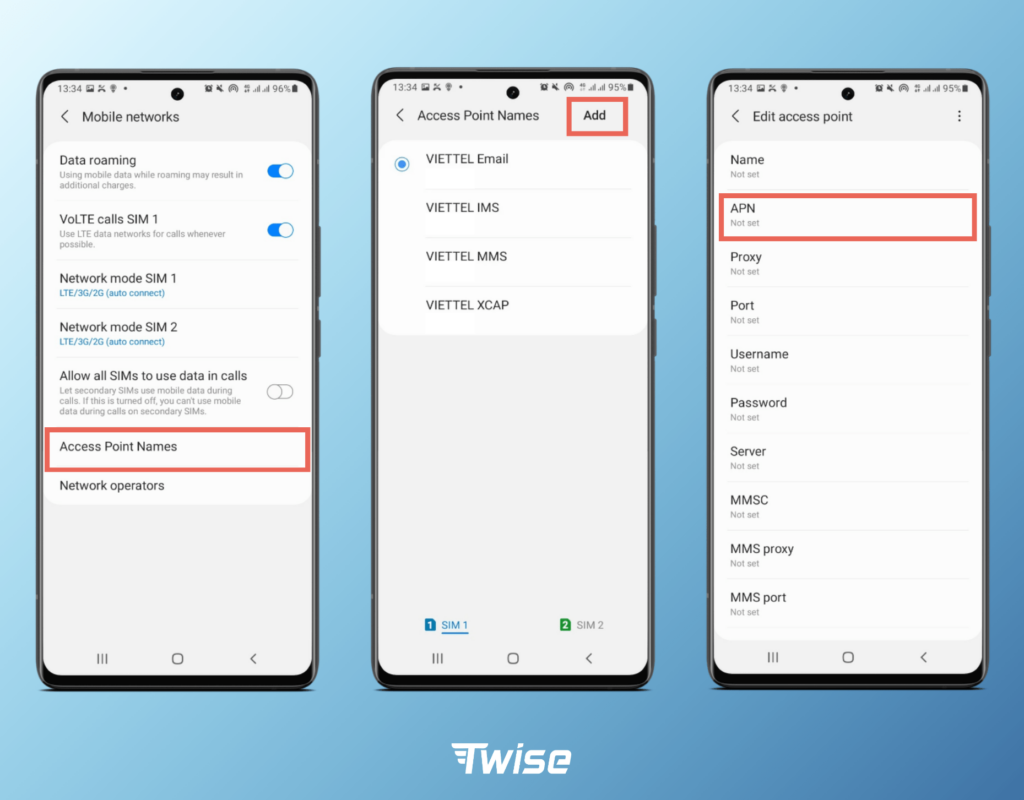
5. Check MTN APN settings
The Access Point Name (APN) tells the phone how to connect to the mobile data network. A missing or incorrect APN can prevent browsing even when the SIM has signal and an active bundle.
MTN’s official internet-settings page gives the following general settings for smartphones and devices:
| Setting | MTN value |
|---|---|
| Account name | MTN WEB |
| APN | web.gprs.mtnnigeria.net |
| Username | Leave blank |
| Password | Leave blank |
| Port | Leave blank |
Automatic setup: MTN says you can text SETTINGS to 3888 free of charge. When the configuration message arrives, save the settings as instructed.
On Android: Open Settings, then Mobile Network or Connections, select the MTN SIM, and look for Access Point Names (APN). Menu names vary by brand. If you need to add an APN, enter the values above, leave unspecified fields unchanged or blank, save it, and select the MTN WEB profile.
On iPhone: APN fields may be hidden or managed automatically by the carrier. Do not install an unknown configuration profile or change carrier settings from an unofficial website. If the APN menu is unavailable, request automatic settings from MTN or contact support.
Do not change proxy, MMSC, MCC, MNC or authentication fields based on random online instructions. MTN’s published general settings do not require you to invent values for those fields.
6. Check your network mode and coverage
If the phone is locked to 2G or 3G, or the selected network mode is unsuitable for the area, data may be slow or unavailable. Set the preferred network mode to an automatic option such as 4G/3G/2G auto or 5G/4G/3G/2G auto where your phone and SIM support it.
MTN’s 4G setup guidance provides device-specific steps for selecting LTE/4G on several Android brands and iPhone. The menu may be called Preferred network type, Network mode or Voice & Data. Do not force 5G-only if coverage is weak; automatic selection allows the phone to fall back to 4G where available.
Test in another location if possible. If data works elsewhere but not at home or work, local coverage, indoor signal or a temporary cell-site fault may be responsible. A 4G or 5G icon alone does not prove that the data session is working. If your phone or SIM is not 4G-enabled, MTN’s 4G LTE page says you can text 4G to 312 to check SIM/device status; if a SIM upgrade is required, visit an MTN service centre.
7. Check whether the line has a restriction or SIM problem
If calls and SMS also fail, or the phone repeatedly shows No service or SIM not provisioned, the issue may be broader than mobile data. Check that the SIM is seated correctly, restart the phone and, if safe, test the SIM in another compatible phone. Do not repeatedly remove the SIM while the phone is powered on if the device manual advises against it.
If the SIM works in another phone, check the original phone’s network settings or software. If the SIM fails in more than one compatible phone, ask MTN to check the line and SIM. If your line has a registration or NIN-related restriction, use MTN’s official support route to confirm the exact status rather than relying on rumours or unofficial codes.
Do not factory-reset your phone as an early troubleshooting step. It can erase data and usually will not fix an account-side issue or network outage.
8. Turn off VPN or private DNS temporarily
A VPN, firewall, private DNS setting or security app can sometimes interfere with particular websites or apps. Temporarily disconnect the VPN and return Private DNS to Automatic, then test a normal webpage. If browsing starts working, review the VPN or DNS configuration rather than leaving security protections disabled indefinitely.
If only one app fails while other websites work, check that app’s permissions, update status and service availability. That is different from an MTN-wide data failure.
9. What if MTN deducted my money but did not activate the data?
Do not purchase the same bundle repeatedly while the first transaction is unresolved. Collect:
- The MTN number that should receive the bundle.
- The bundle name or amount you tried to buy.
- The amount deducted and payment method.
- The transaction reference or bank session ID.
- The date and time of payment.
- A screenshot of the debit alert and any MTN error message.
Contact MTN through the myMTN NG app, Zigi or its call centre and ask for a complaint or ticket reference. If the purchase was made through a bank or third-party reseller, also raise a trace with that provider. MTN’s failed-transaction page explains the details it needs to investigate.

10. When to contact MTN Nigeria
Contact MTN if your bundle is active, your APN and SIM settings are correct, you have restarted the phone, and data still does not work. Also contact support if the line is barred, the SIM is not recognised, or a payment was deducted without a bundle being credited.
MTN’s current help pages direct customers to call 300 from an MTN line. You can also use the Contact Us section in the myMTN NG app or Zigi. Keep the complaint ticket reference so you can follow up.
If MTN does not resolve the complaint within the stated timeline, the NCC says consumers should first complain to the service provider and request a trouble-ticket reference. If the matter remains unresolved, you can escalate it to the NCC through its consumer channels, including toll-free 622. Keep your ticket and transaction evidence.
Quick diagnosis table
| What happens | Likely area to check | First action |
|---|---|---|
| Bank debited, no MTN confirmation | Payment or bundle activation | Keep transaction reference; check balance before buying again |
| Bundle active, no internet on phone | Mobile data SIM, APN or network registration | Select MTN for data, refresh connection, check APN |
| Calls work, data does not | Bundle, APN, data setting or plan restriction | Check balance and APN values |
| Data works in another area | Local coverage or cell-site issue | Report the affected location and times to MTN |
| Only one app cannot connect | App, VPN, DNS or app-specific issue | Test a browser and temporarily check VPN/DNS |
| SIM shows No service in multiple phones | SIM, line or account restriction | Ask MTN to check the line or replace the SIM if needed |
Frequently asked questions
Why is my MTN data not working after subscription?
The bundle may not have activated, the payment may still be pending, the bundle may be expired or exhausted, or your phone may be using another SIM for data. Check the confirmation SMS and data balance first, then check mobile-data and APN settings.
What is the MTN APN for Android and iPhone in Nigeria?
MTN’s published general APN is web.gprs.mtnnigeria.net, with account name MTN WEB and username and password left blank. MTN also says to text SETTINGS to 3888 for automatic settings.
How do I get MTN internet settings automatically?
Text SETTINGS to 3888. MTN says the service is free. Save the settings message when it arrives.
Why does my MTN phone show 4G but no internet?
The 4G icon only indicates a radio connection. The data bundle, APN, mobile-data SIM selection, account status or network data session may still be the problem.
What should I do if MTN deducted money but did not give me data?
Check your bundle balance and wait briefly for a pending transaction. Keep the transaction reference and debit alert, then contact MTN and the payment provider. Avoid buying the same bundle repeatedly before the first transaction is traced.
What number do I call if MTN data is not working?
MTN’s current support pages list 300 for customer care from an MTN line. You can also use myMTN NG or Zigi. Ask for a complaint ticket reference.
Official sources and further reading
- MTN Nigeria: Official internet settings and APN
- MTN Nigeria: 4G settings by device type
- MTN Nigeria: Failed airtime or data transaction
- MTN Nigeria: Data balance, validity and bundle help
- MTN Nigeria: Manage data, usage and exhausted bundles
- MTN Nigeria: 4G LTE SIM and device eligibility
- MTN Nigeria: Official customer-care contact channels
- NCC Consumer Portal: How to escalate an unresolved telecom complaint
- MTN Nigeria: myMTN NG app
- Nigerian Communications Commission: Internet data FAQs and complaint escalation
Related MTN guides
- MTN data plans and prices in Nigeria
- MTN ₦200 for 1GB: eligibility and subscription details
- MTN FlyX not working: fixed broadband troubleshooting
- How to check MTN 5G coverage in Nigeria

Oladepo Babatunde (also known as Prince Babatee Tunde) is a Computer Scientist, researcher, professional content writer and SEO content strategist with more than eight years of experience. He holds a Higher National Diploma (HND) in Computer Science from Kwara State Polytechnic, Nigeria, and is based in Ilorin, Kwara State. As a freelance writer, he creates research-led, practical content on technology, Nigerian internet services, AI tools, gadgets and solar power. His work combines research, source checking, technical understanding and SEO strategy. Where an article includes hands-on testing, the product, method and relevant conditions are described in the article; research-based guides are identified as such.