
If you bought an Airtel data bundle but your phone still shows “No internet,” pages will not load, or only some apps work, do not subscribe again immediately. First confirm that Airtel credited the bundle to the correct number, check what type of data you received, and make sure your phone is using the Airtel SIM for mobile data.
This guide is for Airtel Nigeria mobile SIM users on Android and iPhone. It covers failed or delayed subscriptions, data balance and expiry, social-only bundles, APN settings, dual-SIM settings, network mode, SIM or line problems and how to report a failed payment. It is not a guide to Airtel SmartConnect ODU, MiFi or home routers; those devices have separate account and setup steps.
Start with these five checks
- Check for Airtel’s subscription confirmation SMS or payment receipt.
- Dial
*323#to view your data subscriptions and expiry. - Confirm that mobile data is on and Airtel is selected as the data SIM.
- Turn Airplane Mode on for 10–15 seconds, turn it off and wait for the network to reconnect.
- Switch Wi-Fi off and open a normal website in your browser.
If *323# shows no active bundle, investigate the subscription or payment. If the bundle is active but browsing still fails, continue with the settings and network checks below.
1. Confirm that Airtel actually activated your data bundle
A bank debit, airtime deduction or a completed USSD session does not always mean the data has reached your line. The transaction may be pending, the payment provider may have sent it to the wrong number, or the purchase may have failed between the bank and Airtel.
Check your SMS messages for Airtel’s confirmation, then dial *323#. Airtel says this code displays data subscriptions and validity. You can also check the My Airtel App. If the bundle is missing, note the number you entered, bundle amount, payment method, date and time before contacting support.
Do not buy the same bundle repeatedly while the first transaction is unresolved. If the first purchase eventually completes, you could end up paying twice.
2. Check whether you bought the right type of data
Not every Airtel data bundle works for every website or app. Airtel’s FAQ says its social bundles are designed for selected social apps and cannot be used to browse ordinary websites. Some offers may also have a time window, app restriction or separate bonus allowance.
For example, if WhatsApp works but Chrome, YouTube or other websites do not, check the bundle description and balance details before assuming the APN is wrong. You may have subscribed to a social bundle rather than a general internet bundle.
Dial *312# to view available data plans and read the plan description carefully before buying. Check whether the allowance is general data, app-specific data, night data, bonus data or a router-only bundle.
3. Check your Airtel data balance and expiry
Dial *323# from the Airtel line. Airtel says the menu shows your data subscriptions and expiry date. You can also open My Airtel App and review the bundle details.
Check all of the following:
- Remaining volume: The bundle may already be exhausted.
- Expiry date: A bundle can reach its expiry date with unused data remaining. Airtel’s FAQ describes grace periods of 1 day for daily plans, 3 days for weekly plans and 7 days for monthly plans. To roll over unused data, Airtel says you must renew the same bundle before the grace period ends; check the current plan terms because Airtel can update offers.
- Bundle type: General, social, night, bonus and router bundles may have different usage rules.
- Correct number: If you bought data for another person, confirm that you entered the intended Airtel number.
If your data has finished, check the next-bundle options using *312#. Do not assume an old bonus or social allowance can be used for normal browsing. If a bundle has just expired, check whether it is still within Airtel’s grace period and whether the same bundle can be renewed for rollover.
4. Make sure your phone is using the Airtel SIM for mobile data
On a dual-SIM phone, Airtel can receive calls and SMS while the other SIM handles internet access. The data bundle may be active, but the phone is trying to browse through the wrong line.
- Android: Open Settings, then SIM cards, SIM manager or Mobile network. Under Mobile data or Preferred SIM for data, select Airtel. Make sure mobile data is enabled for that SIM.
- iPhone: Open Settings, Mobile Service (or Cellular), then Mobile Data. Select the Airtel line if more than one line is enabled.
Turn Wi-Fi off temporarily while testing. Otherwise, a working Wi-Fi connection can make it look as though Airtel mobile data is working when the phone is not using it at all.
5. Refresh the Airtel mobile connection
A temporary connection or network-registration issue may clear after the phone reconnects.
- Turn Airplane Mode on for 10–15 seconds.
- Turn it off and wait for Airtel to reconnect.
- Switch mobile data off and back on.
- Restart the phone if browsing still fails.
- Test a normal website with Wi-Fi disabled.
If several Airtel users around you have the same problem, it may be a local network fault rather than a setting on your phone. Try again in another location if possible, and report the affected area and time to Airtel.
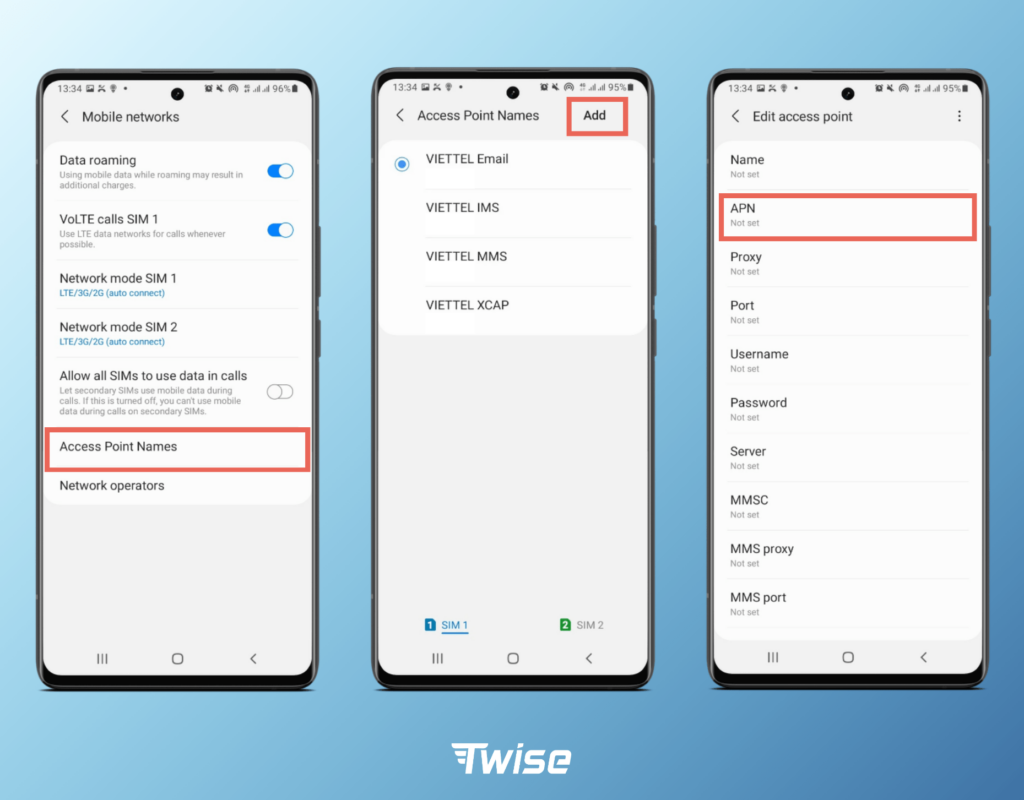
6. Correct the Airtel APN settings
The Access Point Name (APN) tells your phone how to connect to Airtel’s mobile data service. Airtel publishes the following general smartphone settings:
| Setting | Airtel value |
|---|---|
| APN name | Airtel Internet |
| APN | Internet.ng.airtel.com |
| Username | Leave blank |
| Password | Leave blank |
Automatic setup: Airtel says to text Internet to 232 to receive automatic internet settings. Save the settings message as instructed.
Android: Open Settings, then Mobile Network or Connections. Select the Airtel SIM and look for Access Point Names (APN). If the Airtel Internet profile is missing, add one using the values above, save it and select it. The exact menu names differ between Samsung, Tecno, Infinix, Xiaomi and other Android phones.
iPhone: APN fields may be hidden or managed by the carrier. If you cannot edit them, request automatic settings from Airtel or contact support. Do not install configuration profiles from unknown websites.
Leave username and password blank. Do not copy proxy, port, MMSC or authentication values from an unrelated network or random online tutorial.

7. Check network mode, signal and coverage
If your phone is locked to an unsuitable network mode, it may struggle to connect. In your mobile-network settings, use an automatic option such as 4G/3G/2G auto or 5G/4G/3G/2G auto if your phone, SIM and location support it.
Avoid forcing 5G-only when coverage is weak. Automatic mode lets a compatible phone fall back to 4G or another available network. If the data works in one neighbourhood but not another, coverage or a local site fault may be involved.
Check Airtel’s coverage information and test outdoors or in another part of the building. Thick walls, basements and some building materials can weaken mobile reception. Signal bars alone do not guarantee a working data session.
8. Check whether the SIM or Airtel line has a problem
If calls and SMS also fail, or the phone displays No service or SIM not provisioned, the issue may not be limited to mobile data.
- Restart the phone and check that the SIM is seated correctly.
- If possible, test the Airtel SIM in another compatible phone.
- If the SIM works in another phone, review the original phone’s network settings and software.
- If it fails in more than one compatible phone, ask Airtel to check the line or SIM.
If the line has a registration or identity-verification restriction, use Airtel’s official support channels to confirm its status. Do not rely on unofficial codes or pay someone online who claims they can remove a network restriction.
9. Check whether a VPN or Private DNS is blocking access
A VPN, firewall, Private DNS setting or security app can interfere with some websites or services. Temporarily disconnect your VPN and set Private DNS to Automatic, then test a normal webpage. If the page loads, review the VPN or DNS configuration. Do not leave security protections disabled permanently just to browse.
If only one app fails while other websites work, check that app’s permissions, update status and service availability. That points to an app-specific problem rather than a complete Airtel data failure.
10. Turn off PAYU if Airtel keeps deducting airtime
Airtel’s official FAQ says customers can opt out of Pay-As-You-Use (PAYU) browsing by dialling *400*1#. This is useful if your bundle finishes and you do not want browsing charges to continue coming from your airtime.
Airtel’s data-plan page currently lists PAYU browsing at ₦4.60 per MB and says *400# is the PAYU access code. Rates and terms can change, so check Airtel’s current page before relying on a charge amount. Do not dial the PAYU access code to opt out; use the opt-out code shown in Airtel’s FAQ.
PAYU is separate from the data bundle itself. Turning it off will not restore an exhausted bundle or fix an APN problem; it prevents the line from using the PAYU option. Check your balance with *323# and subscribe to another suitable bundle with *312# if you need more data.
What to do if Airtel deducted money but did not give you data
The Nigerian Communications Commission advises consumers to check transaction alerts, wait briefly if a payment may still be processing, and contact the bank with the transaction amount, phone number, date and time if the service is not delivered. Keep your receipt or transaction reference until the issue is resolved.
Prepare these details before contacting your bank or Airtel:
- The Airtel number that should receive the data.
- The bundle name or amount purchased.
- The amount deducted and payment channel.
- The transaction reference, bank session ID or payment receipt.
- The date and time of purchase.
- Any Airtel SMS or error message received.
Raise the issue with the bank or payment provider and Airtel, and keep the complaint reference from each. The NCC’s published failed-transaction guidance explains the steps for consumers; do not assume a bank debit automatically proves Airtel received the purchase request.
When to contact Airtel Nigeria
Contact Airtel if your bundle is active, you have selected Airtel for mobile data, APN settings are correct and the connection still fails. Also contact support if your SIM is not recognised, the line appears restricted or a payment has not resulted in a bundle.
Airtel’s official contact page lists 300 from an Airtel line. If you are calling from another network or outside Nigeria, it lists +234 802 150 0300. You can also email customercare@ng.airtel.com. Ask for a complaint reference or ticket number and keep it.
If Airtel does not resolve the complaint within the communicated timeline, the NCC says you can escalate with your service-provider complaint reference. Its toll-free consumer line is 622.
Quick Airtel data troubleshooting table
| What you notice | What it may mean | What to do first |
|---|---|---|
| Bank debited but no bundle SMS | Payment pending, failed or sent to the wrong number | Check *323#; keep the receipt and contact the bank/provider |
| WhatsApp works but websites do not | Possibly a social-only bundle | Check bundle type and terms |
| Bundle active but no browsing | Wrong data SIM, APN or connection issue | Select Airtel for data, refresh connection and check APN |
| Data works in another area | Local coverage or site issue | Report the affected location and time to Airtel |
| Calls and SMS also fail | SIM, line or registration issue | Test SIM in another compatible phone and contact Airtel |
| Airtime reduces after data finishes | PAYU browsing may be enabled | Dial *400*1# to opt out of PAYU |
| Only one app fails | App, VPN or DNS issue | Test another app/site and review VPN or Private DNS |
Frequently asked questions
Why is my Airtel data not working after subscription?
The bundle may not have activated, may have expired or may be restricted to selected apps. Your phone may also be using another SIM for data, or the APN or network connection may need attention. Start by checking *323#.
What is the Airtel APN for Nigeria?
Airtel’s published APN is Internet.ng.airtel.com. Leave the username and password blank. You can also text Internet to 232 for automatic settings.
How do I check my Airtel data balance?
Dial *323# from your Airtel line. Airtel says the menu displays your data subscriptions and expiry date. You can also use My Airtel App.
What is the Airtel data subscription code?
Dial *312# to view available data plans and subscribe. Read the plan description to confirm whether it is general data, social data or another restricted bundle.
Why does my Airtel data work on WhatsApp but not Chrome?
Check whether you bought a social bundle. Airtel says social bundles are designed for selected apps and cannot be used for ordinary web browsing.
What number can I call for Airtel customer care?
Airtel lists 300 from an Airtel line. From another network or outside Nigeria, it lists +234 802 150 0300. You can also email customercare@ng.airtel.com.
What should I do if Airtel deducted money but did not activate my data?
Check *323#, keep the transaction reference and contact your bank or payment provider and Airtel. Do not repeatedly buy the same bundle while the first transaction is being investigated.
Official sources and further reading
- Airtel Nigeria: Official FAQs — data balance, APN, bundles, PAYU opt-out and validity grace periods
- Airtel Nigeria: PAYU rates and data bundle terms
- Airtel Nigeria: Official customer-care contact details
- Airtel Nigeria: Data plans and subscription options
- NCC: Guide to resolving failed airtime and data transactions
- NCC: Telecom complaint resolution process
Related Airtel and internet guides
- Airtel data plans and prices in Nigeria
- Airtel SmartConnect 5G ODU price, device and installation guide
- Airtel ODU connected but no internet: troubleshooting guide
- MTN data not working after subscription: causes and fixes

Oladepo Babatunde (also known as Prince Babatee Tunde) is a Computer Scientist, researcher, professional content writer and SEO content strategist with more than eight years of experience. He holds a Higher National Diploma (HND) in Computer Science from Kwara State Polytechnic, Nigeria, and is based in Ilorin, Kwara State. As a freelance writer, he creates research-led, practical content on technology, Nigerian internet services, AI tools, gadgets and solar power. His work combines research, source checking, technical understanding and SEO strategy. Where an article includes hands-on testing, the product, method and relevant conditions are described in the article; research-based guides are identified as such.