Are you in Nigeria and find yourself wondering, “How can I know my Airtel number?” Look no further! In this comprehensive how to check Airtel number guide, we’ll walk you through various methods to help you easily discover your Airtel number. Whether you’re a long-time Airtel user or just got a new SIM card, we’ve got you covered.
So, let’s dive right in and unravel the mystery of how to find your Airtel number effortlessly!
What Is My Airtel Number?
Before we delve into the nitty-gritty of finding your Airtel number, let’s clarify what exactly an Airtel number is. Your Airtel number is a unique 10-digit combination that serves as your identity on the Airtel network in Nigeria. It’s what you share with friends, family, and colleagues to stay connected.
Now, let’s move on to the burning question: “How can I know my Airtel number?”
How Can I Check My Number On Airtel?
1. How Can I Know My Airtel Number Using USSD Code: *121*3*4#
To swiftly uncover your Airtel number, grab your phone and follow these easy steps!
- Simply dial *121*3*4# from your Airtel SIM card.
- Press the call button.
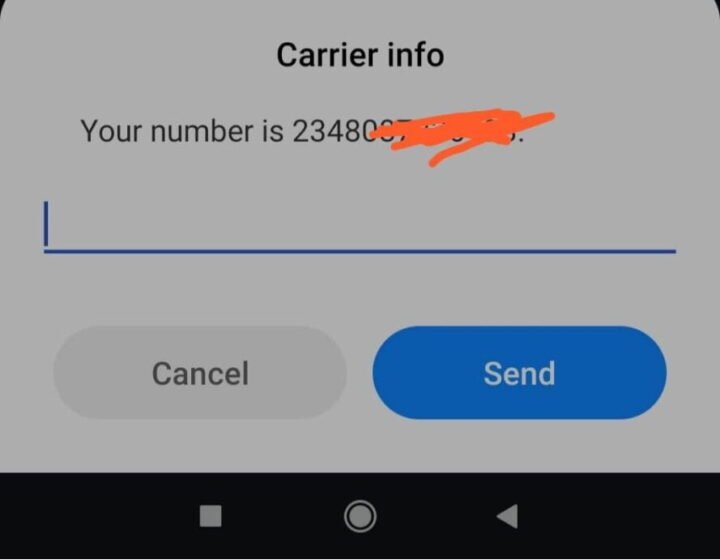
- Within seconds, a pop-up message will appear on your screen, displaying your Airtel number.
- Voila! You’ve found your Airtel number!


There you have it, you have your mobile number. Make sure to save it somewhere you can get it easily.
2. How To Check My Airtel No By Calling Customer Care Service Desk: Dial 111
If you prefer a more direct approach, this one’s for you!
- Grab your Airtel phone.
- Dial 111, which is Airtel’s customer care service number.
- Follow the voice prompts and listen carefully.
- You will hear your Airtel number read aloud.
- That’s it! Your Airtel number is now revealed.
3. How To Check My Airtel No By SMS: Text “Number” to 121
Sending an SMS is quick and hassle-free!
- Open your phone’s messaging app.
- Compose a new message.
- In the message body, type the word “Number” (without quotes).
- Send this message to the number 121.
- In a matter of moments, you will receive an SMS containing your Airtel number.
4. How To Check For Airtel Number by Calling a Friend or Family Member
- If you have a friend or family member whose number you know, give them a call.
- Request them to check their call history for a recent missed call from your number.
- The number that called them is your Airtel number!
5. Visit an Airtel Store
- If all else fails, visit your nearest Airtel store.
- Present valid identification and request assistance in retrieving your Airtel number.
How To Check For Airtel Number Using MyAirtel Mobile App
If you prefer a convenient and tech-savvy way to check your Airtel number, using the MyAirtel mobile app is the perfect solution. With just a few taps on your smartphone, you can access not only your Airtel number but also other essential information about your Airtel account. Let’s dive into the simple steps to get you started.
1. Download the MyAirtel App
Don’t wait! Head to your app store now and download the MyAirtel app to unveil your Airtel number!
- Open your device’s app store, whether it’s the Google Play Store for Android or the Apple App Store for iOS.
- In the search bar, type “MyAirtel” and hit the search button.
- Look for the official MyAirtel app, which is typically offered by Airtel itself.
- Tap the “Install” button to begin the download.
2. Launch the MyAirtel App
- Once the app is installed, tap the MyAirtel icon on your home screen to open it.
- Allow the app to access necessary permissions if prompted.
3. Log In or Register
- If you’ve used the MyAirtel app before and have an account, log in with your credentials.
- If you’re a new user, you’ll need to register for an account. Follow the on-screen prompts to create your account.
4. Navigate to the Main Page
- Once you’re logged in, you’ll find yourself on the app’s main page. This page provides an overview of your Airtel account.
5. Find Your Airtel Number
- On the main page, you can easily locate your Airtel number displayed prominently.
- Additionally, the MyAirtel app offers access to various features, such as checking your SIM card subscriptions, Airtel data balance, and more.
- Explore the app to discover the wealth of information it provides about your Airtel services.
Using the MyAirtel mobile app is a convenient way to not only check your Airtel number but also manage and monitor your Airtel account efficiently. With just a few taps, you can access vital information and stay connected with Airtel services hassle-free.
So, if you’re looking for a modern and user-friendly approach to checking your Airtel number, head to your app store, download the MyAirtel app, and unveil your Airtel details in no time!
How Can I Know My Airtel Number FAQs
Is there a charge for using these methods to check my Airtel number?
What if I have a dual SIM phone? How do I know which number is for Airtel?
Can I use these methods if my Airtel SIM card is not registered?
I’ve lost my SIM card. Can I still find my Airtel number?
What if I suspect my Airtel SIM is inactive?
Can I check my Airtel number without a SIM card?
Conclusion
Congratulations! You’ve successfully learned how to find your Airtel number in Nigeria using simple and convenient methods. Whether you prefer the quick USSD code, direct customer care assistance, or an SMS query, you now have the power to unveil your Airtel identity.
Remember that knowing your Airtel number is essential for staying connected with loved ones, managing your account, and enjoying Airtel services to the fullest.
So, the next time you ask yourself, “How can I know my Airtel number?” you’ll have the answer at your fingertips. Don’t hesitate to share this guide with your friends and family to help them uncover their Airtel numbers too.
Stay connected, stay informed, and enjoy the convenience of having your Airtel number at your fingertips!