Last updated on December 14, 2025
Discovering unfamiliar entries like “SYNCB/PPC” or “CCB PPC TIMONIUM MD” on your credit report can certainly be a cause for concern or confusion. Let’s clarify what these entries mean and why they might appear on your financial record.
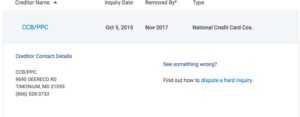
First, SYNCB/PPC is an abbreviation for Synchrony Bank/PayPal Credit. Similarly, CCB PPC TIMONIUM MD stands for Comenity Capital Bank/PayPal Credit. The “Timonium, MD” often indicates a specific operational location associated with Comenity Capital Bank, which is a common practice for financial institutions reporting to credit bureaus.
Both of these entries are directly related to the popular PayPal Credit line of credit, which you might remember by its former name, Bill Me Later.
Essentially, Synchrony Bank and Comenity Capital Bank are the financial institutions that have, at different times, issued or serviced PayPal Credit accounts. This means that if you’ve ever applied for or used PayPal Credit, an entry from one of these banks is likely to appear on your credit report. These entries can manifest in a few ways: as a hard inquiry if you recently applied, as an active account if you currently use PayPal Credit, or as a closed account if you previously had one.
These entries almost always stem from a past or present association with a PayPal Credit account, whether you opened it yourself or it was opened in your name. For more information on Comenity Capital Bank, you can visit the Comenity Capital Bank Official Site.
The History of PayPal Credit and Its Banks
To fully grasp why you might see SYNCB/PPC or CCB PPC TIMONIUM MD on your credit report, it’s helpful to understand the journey of PayPal Credit itself. This popular financing option didn’t always go by its current name; it originated as ‘Bill Me Later’.
PayPal Credit is essentially a revolving line of credit that’s offered to eligible PayPal account holders, allowing them to make purchases and pay over time. Over the years, the servicing and ownership of these accounts have transitioned between different financial institutions. Notably, Synchrony Bank acquired the PayPal Credit accounts from PayPal Holdings in 2018, taking over the responsibility for managing and reporting on these credit lines.
Prior to this, and at other points, Comenity Capital Bank has also been associated with operating PayPal Credit accounts.
These changes in ownership and servicing banks are crucial because they directly impact how your PayPal Credit activity is reported to the major credit bureaus. When a portfolio of accounts changes hands, new reporting practices often follow, which can lead to the appearance of new or updated entries on your credit report under the name of the current or former servicing bank. For more details on the service, you can visit the PayPal Credit Official Page.
Why SYNCB/PPC or CCB PPC TIMONIUM MD Appears on Your Credit Report
The presence of SYNCB/PPC or CCB PPC TIMONIUM MD on your credit report isn’t random; it’s typically linked to specific interactions you’ve had, or someone else has had, with PayPal Credit. Understanding these reasons can help you determine the next steps.
Hard Inquiries
One common reason for these entries is a hard inquiry. If you applied for a PayPal Credit account, whether recently or in the past, Synchrony Bank or Comenity Capital Bank would have performed a credit check. This credit check appears as a hard inquiry on your report.
Hard inquiries can remain on your credit report for up to two years, even if your application wasn’t approved or you decided not to open the account.
Active or Closed Accounts
If you previously had a PayPal Credit or Bill Me Later account, it will appear on your credit report as either an active or closed account. Banks like Synchrony and Comenity are responsible for reporting all account activity to the major credit bureaus, including your payment history, current balances, and credit limits. Sometimes, accounts may appear for the first time, or under a new name, due to changes in reporting policies following bank acquisitions or transfers of account portfolios.
Even if you haven’t used your PayPal Credit account in a while and it has a zero balance, the bank might close it due to inactivity. This will then be reported as a closed account on your credit file.
Identity Theft
Perhaps the most concerning reason for an unrecognized entry is identity theft. If you find an SYNCB/PPC or CCB PPC TIMONIUM MD entry on your report that you absolutely do not recognize and have no association with, it could signal fraudulent activity where someone opened an account in your name without your permission. In such cases, immediate action is crucial.
Impact on Your Credit Score and What It Means
The presence of these entries on your credit report can affect your credit score in various ways, depending on their nature. Understanding these impacts is key to managing your financial health effectively.
Firstly, if the entry is a hard inquiry from an application, it can cause a small, temporary dip in your credit score. This dip is usually minor and recovers over a few months, but multiple hard inquiries in a short period can signal higher risk to lenders.
For active accounts, these entries contribute significantly to several factors that make up your credit score. Your payment history, for instance, is a major component; making on-time payments consistently on your PayPal Credit account will improve your score. Conversely, late payments or defaults on these accounts can significantly harm your credit score, potentially staying on your report for up to seven years.
Credit utilization, which is the amount of credit you’re using compared to your total available credit, is another key factor. Using a large portion of your available PayPal Credit can negatively impact your score, even if you make payments on time.
Finally, the length of your credit history is also influenced. An active or closed PayPal Credit account contributes to the overall age of your credit file. While closed accounts no longer report new activity, they remain on your report for a period and continue to contribute to the length of your credit history, which can be beneficial for your score.
For a comprehensive view of your credit, regularly check your reports. You can do this for free annually at AnnualCreditReport.com.
Steps to Investigate and Verify the Entry
If you spot an unfamiliar entry like SYNCB/PPC or CCB PPC TIMONIUM MD on your credit report, the first crucial step is to investigate and verify its legitimacy and accuracy. This proactive approach can prevent potential issues.
Your initial action should be to obtain copies of your credit reports from all three major credit bureaus: Equifax, Experian, and TransUnion. You can do this for free once every 12 months through AnnualCreditReport.com. Once you have your reports, carefully review the entry in question.
Look for specific details such as the account opening date, the credit limit, the current balance, and the payment history. These details can often jog your memory or provide clues.
Next, cross-reference the entry with your personal financial records. Think back to any past PayPal activity, especially applications for PayPal Credit or Bill Me Later. Check old statements or emails that might confirm an account.
If you recognize the account but have questions about its specific details, such as an incorrect balance or payment status, contact Synchrony Bank or Comenity Capital Bank directly. You can find contact information on the Synchrony Bank Official Site or Comenity Capital Bank’s official website. Throughout this process, keep detailed records of all communications, including dates, the names of people you spoke with, and any reference numbers provided.
This documentation will be invaluable if you need to dispute the entry later.
What to Do If You Recognize the Account
If, after your investigation, you confirm that the SYNCB/PPC or CCB PPC TIMONIUM MD entry is legitimate and belongs to you, your next steps depend on whether the information is accurate or not.
If the account is legitimate and all the information reported is accurate, the best course of action is to continue managing it responsibly. This means making all your payments on time and striving to keep your credit utilization low. Responsible management will help build a positive payment history, which is a significant factor in maintaining a healthy credit score.
However, if the account is legitimate but contains inaccurate information—such as an incorrect balance, a misreported payment status, or an inaccurate account opening date—you should dispute the error. You’ll need to file a dispute directly with the credit bureau(s) reporting the inaccuracy and also with the bank (Synchrony Bank or Comenity Capital Bank) that furnished the information. When disputing, be sure to provide any supporting documentation you have, such as bank statements or payment confirmations, to back up your claim.
Finally, always make sure you understand the terms and conditions of your PayPal Credit account, including any interest rates and fees, to avoid future surprises.
Immediate Actions for Unrecognized Entries (Suspected Identity Theft)
Discovering an SYNCB/PPC or CCB PPC TIMONIUM MD entry on your credit report that you don’t recognize is a serious matter and could be a sign of identity theft. Acting swiftly and decisively is crucial to protect your financial well-being.
Your first immediate action should be to contact the bank directly. Reach out to Synchrony Bank or Comenity Capital Bank to report the fraudulent account. Inform them that you did not open the account and suspect identity theft.
They will guide you through their internal fraud investigation process.
Simultaneously, you must dispute the entry with all three major credit bureaus: Equifax, Experian, and TransUnion. Clearly state that the account is fraudulent and was not opened by you. Each bureau has an online dispute process, or you can send a dispute letter via mail.
Next, place a fraud alert on your credit reports. This alert signals to potential creditors that they should take extra steps to verify your identity before opening new accounts. You only need to contact one of the three credit bureaus to place an initial 90-day fraud alert, and that bureau will notify the other two.
For stronger protection, consider implementing a credit freeze. A credit freeze restricts access to your credit report, making it much harder for identity thieves to open new credit in your name. You’ll need to place a freeze with each of the three credit bureaus individually.
It’s also essential to file an official identity theft report with the Federal Trade Commission (FTC) at IdentityTheft.gov. This report is a critical document that can help you remove fraudulent accounts from your credit report and serve as proof of identity theft to creditors.
Finally, change passwords for all your financial accounts, email, and any other sensitive online services. Use strong, unique passwords for each. Continuously monitor your credit reports and bank statements for any further suspicious activity, as identity thieves often attempt to open multiple accounts.
Can SYNCB/PPC or CCB PPC TIMONIUM MD Be Removed From Your Credit Report?
Whether SYNCB/PPC or CCB PPC TIMONIUM MD entries can be removed from your credit report largely depends on if they are accurate, inaccurate, or fraudulent. It’s important to have realistic expectations about what can and cannot be removed.
Generally, accurate, legitimate entries—even if they reflect negative information like late payments—cannot be removed from your credit report before their statutory reporting period. For most negative items, this is typically seven years, while hard inquiries remain for up to two years. These entries are part of your credit history and are meant to provide a complete picture to lenders.
However, if the entry contains inaccurate information, such as an incorrect balance, wrong account status, or an error in the account opening date, then it absolutely can and should be disputed. By following the proper dispute process with both the credit bureaus and the reporting bank, you can often get these errors corrected or removed.
For fraudulent entries, meaning accounts opened due to identity theft, removal is possible. Once you’ve filed an identity theft report with the FTC and disputed the account with the credit bureaus, these fraudulent accounts can be removed from your report, helping to clear your name.
While services like credit repair companies (e.g., Lexington Law) specialize in disputing negative items, it’s crucial to understand that they cannot legally remove accurate, legitimate information from your credit report. Their effectiveness lies in identifying and disputing inaccuracies or fraudulent entries on your behalf. Ultimately, the best way to ‘remove’ legitimate negative entries is often to wait for them to age off your report naturally while diligently building a positive credit history through responsible financial habits.
Frequently Asked Questions About PayPal Credit Entries
Credit report entries can raise many questions, especially concerning items like SYNCB/PPC or CCB PPC TIMONIUM MD. Here are answers to some common inquiries about PayPal Credit entries:
Does PayPal Credit have an annual fee?
No, PayPal Credit typically does not have an annual fee. However, be aware that transaction fees may apply for certain uses or if you don’t pay your balance in full within promotional periods.
What is the interest rate for PayPal Credit?
PayPal Credit usually has a high variable Annual Percentage Rate (APR) if the balance is not paid in full within a promotional period (e.g., 6 months for purchases over a certain amount). It’s crucial to review the specific terms and conditions of your account for the exact interest rate.
How can I contact Synchrony Bank or Comenity Capital Bank about my PayPal Credit account?
You can typically find contact information for Synchrony Bank and Comenity Capital Bank on their respective official websites. Look for customer service numbers or dedicated PayPal Credit support lines. You may also find contact details within your PayPal account if it’s linked to PayPal Credit.
Will closing my PayPal Credit account remove it from my credit report?
No, closing your PayPal Credit account will not remove it from your credit report. It will simply be reported as a “closed account” and will remain on your report for a period, continuing to contribute to your credit history, particularly the length of your credit history.
How long does it take for a dispute to be resolved?
Once you file a dispute with a credit bureau, they typically have 30 to 45 days to investigate and respond to your claim. The bank furnishing the information also has a similar timeframe to respond to the bureau’s inquiry.
Can I still use PayPal without PayPal Credit?
Yes, absolutely. PayPal and PayPal Credit are separate services. You can continue to use your standard PayPal account for payments, sending money, and other services without having or using PayPal Credit.
Final Thoughts: Proactive Credit Management
Encountering unfamiliar entries like SYNCB/PPC or CCB PPC TIMONIUM MD on your credit report can be unsettling. However, it’s also an opportunity for proactive credit management. The key takeaway is the importance of vigilance and informed action.
Make it a regular habit to monitor your credit reports for accuracy and any suspicious activity. Understanding that legitimate credit entries, even if they seem unfamiliar due to bank changes or historical account names, are a part of your financial history is crucial. If you suspect identity theft or find errors, act swiftly and decisively by contacting the relevant banks and credit bureaus.
Ultimately, focusing on building and maintaining a positive credit history through responsible financial habits—like paying bills on time and keeping credit utilization low—is the most effective strategy for long-term financial health. Don’t hesitate to seek professional financial advice when facing complex credit challenges; experts can provide tailored guidance to help you navigate your unique situation.