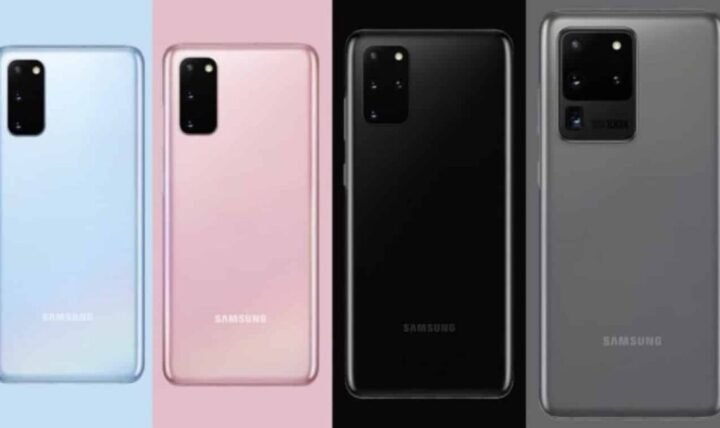
If you’re still using your trusty Samsung Galaxy S20, S20+, or S20 Ultra in late 2025, you’re likely wondering about its current support status and security.
The short answer is that official major software and monthly security updates for these models ended in April 2025.
But, your device still receives critical security fixes through Google Play System Updates, which are vital for ongoing protection.
This article will help you understand what this means for your phone today and how to keep it as secure as possible.
We’ll also take a look back at a specific time when the Samsung Galaxy S20 Series was receiving its July 2021 security update, providing context for how updates have evolved.
You’re probably asking, “Is my Galaxy S20 still getting updates?” or “Is Galaxy S20 still safe to use in 2025?” We’ll dive into the official Galaxy S20 software support 2025 landscape and offer practical advice.
We’ll cover how to check for any remaining updates and best practices for keeping your device secure, even as an older model.
Key Takeaways: S20 Updates in a Nutshell (2025)
Here’s a quick rundown for your Galaxy S20 series phone in December 2025. The original S20, S20+, and S20 Ultra officially reached their Samsung S20 security patch end of life in April 2025.
This means they are no longer receiving regular major Android version upgrades or monthly security patches.
But, your device still benefits from critical fixes delivered through Google Play System Updates, which are essential for maintaining security.
Interestingly, some Galaxy S20 phones on Verizon even received a surprise security patch in July 2025, several months after official support ended.
The Galaxy S20 FE updates 2025 situation is slightly different, as that model often receives support for a bit longer.
A Look Back: The July 2021 Security Update
Back in July 2021, the Samsung Galaxy S20 series was still relatively new, and users were keen for the latest improvements. That month delivered a significant security update that also addressed various system issues.
This particular update went beyond just security; it also aimed to resolve some common user annoyances. It was a standard part of the regular Android security updates cycle for Samsung devices at the time.
What the July 2021 Patch Addressed
A key focus of the July 2021 security update for Galaxy S20 users was stability, particularly concerning Android Auto.
Many users had been experiencing connection or performance glitches with Android Auto, and this patch was designed to resolve those issues, making the experience smoother.
Beyond Android Auto, the update delivered general security enhancements.
It patched various vulnerabilities, often identified as CVEs (Common Vulnerabilities and Exposures) and SVEs (Samsung Vulnerabilities and Exposures), which could potentially be exploited to compromise the phone’s security.
Initial Rollout and Firmware Versions
The July 2021 update initially rolled out in specific regions. Reports from tech sites like SamMobile and 9to5Google, for example, indicated that users in Germany were among the first to receive it.
The specific firmware versions varied based on whether you owned the LTE or 5G variant of the device.
For instance, the G98xFXXU8DUF9 firmware was common for the LTE models, while the G98xBXXU8DUF9 firmware was typically for the 5G versions of the Galaxy S20, S20+, and S20 Ultra.
Galaxy S20 Series: Official Software Support in 2025
It’s important to be clear about your Galaxy S20‘s status today, in December 2025. For the original Galaxy S20, Galaxy S20+, and Galaxy S20 Ultra, official major software support has indeed concluded.
This means Samsung is no longer guaranteeing new Android operating system versions or regular monthly security patches for these specific models. This aligns with the normal One UI lifecycle and Samsung’s established update policy.
End of Major OS and Security Patches
The official Galaxy S20 end of life 2025 for regular updates occurred in April of this year. After receiving the March 2025 security patch, the main S20 series officially ceased to receive regular security and OS updates.
The final major Android OS version these phones received was Android 13, coupled with One UI 5.1. So, if you’re wondering, “Is my Galaxy S20 getting Android 14?”, the unfortunate answer is no.
The Unexpected July 2025 Patch (Verizon)
Here’s where things get interesting and a bit surprising: Despite the official end of support, some Galaxy S20 owners on Verizon in the US received an unexpected security update in July 2025.
This type of carrier-specific update, months after official support concludes, is quite rare. It suggests a critical fix might have been necessary, or it could have been part of a specific carrier agreement.
It serves as a reminder that occasionally, even after the official support period, minor patches can still emerge.
Galaxy S20 FE: A Slightly Different Path
The Galaxy S20 FE (Fan Edition) often follows a slightly different update schedule. It typically receives security updates for a bit longer than the original S20 lineup.
For example, Galaxy S20 FE updates 2025 continued for a while, with some models even receiving a January 2025 patch.
So, if you own an S20 FE, you might have enjoyed a few extra months of official support compared to the main series.
| Galaxy S20 Model | Official Support End (Regular Updates) | Last Major Android OS | Google Play System Updates in 2025? |
|---|---|---|---|
| Galaxy S20 | April 2025 | Android 13 / One UI 5.1 | Yes |
| Galaxy S20+ | April 2025 | Android 13 / One UI 5.1 | Yes |
| Galaxy S20 Ultra | April 2025 | Android 13 / One UI 5.1 | Yes |
| Galaxy S20 FE | Slightly later (e.g., received Jan 2025 patch) | Android 13 / One UI 5.1 | Yes |
Why Security Updates Remain Critical (Even for Older Devices)
Even if your phone isn’t receiving new Android versions, security updates remain critically important. They act like the immune system for your device, protecting it from new threats and vulnerabilities.
Running an outdated phone without regular security patches can expose you to various risks. These can include malware, data theft, or other forms of cyber attack.
New threats are constantly emerging, which is why mobile device security best practices are always evolving. Hackers often target known flaws (CVEs) in older software versions, knowing many devices won’t be patched.
This makes cybersecurity for older devices a significant concern. Threats like zero-day exploits, which are attacks that take advantage of previously unknown software vulnerabilities, can be particularly dangerous on unsupported phones.
How to Check for Updates on Your Galaxy S20 (in 2025)
So, how do you check for updates on your Galaxy S20 now that it’s 2025?
While major OS updates are highly unlikely, it’s still worth checking for any lingering carrier-specific patches, such as the surprising Verizon S20 patch from July.
It’s a good habit to check periodically, just in case. But, don’t expect to see significant changes or new features.
Automatic Over-the-Air (OTA) Checks
Checking for updates is quite straightforward. You simply need to access your phone’s settings. This is the standard method to find an OTA update S20 if one becomes available.
Here’s how to do it:
- Open the Settings app on your Galaxy S20.
- Scroll down and tap on “Software update.”
- Tap “Download and install.”
Your phone will then check with Samsung’s servers to see if any updates are available for your specific model and region.
If an update is found, you’ll be given the option to download and install it.
Understanding Google Play System Updates
Even though your Galaxy S20 isn’t receiving regular OS updates, there’s a crucial distinction: Google Play System Updates. These are separate from Samsung’s software updates and come directly from Google.
These updates provide critical security fixes for core Android components, often delivered through a modular system called Project Mainline.
They play a significant role in keeping your phone safe, even if the main OS version is older.
To check for these, navigate to Settings > Security and privacy > Updates > Google Play system update. You should continue to see these updates coming through, which is excellent for your phone’s long-term security posture.
What to Do If Your Galaxy S20 Is No Longer Supported
So, if your Galaxy S20 is no longer receiving official updates, what should you do? You have a few options, all centered on balancing security with usability.
You can certainly continue using it, but with some smart precautions.
This is where effective device longevity tips come into play. Being proactive is key to protecting your data and privacy on an older device.
Prioritizing Data Security and Privacy
The most important aspect is protecting your personal information. Ensure you use strong, unique passwords for all your accounts; considering a password manager can be very helpful.
Be highly selective about the apps you install. Only download from the official Google Play Store, and always review app permissions carefully before granting them.
While Google Play Protect offers a good baseline, user vigilance remains crucial.
Regularly back up your important data, such as photos and documents, to a cloud service or an external drive.
This ensures that if anything goes wrong with your device, you won’t lose valuable files and memories.
Considering an Upgrade: When and Why
While an unsupported phone can certainly still be used, there often comes a point where an upgrade becomes a sensible choice.
Newer phones, such as the latest Galaxy S25 series, offer significantly longer software support, improved cameras, faster performance, and access to the latest features you might be missing.
If you’re noticing persistent slowdowns, significant battery degradation, or if you simply feel your current phone isn’t secure enough for your needs, it might be time to consider an upgrade.
Many carriers and Samsung themselves offer trade-in programs that can make upgrading more affordable.
| Action | Description | Why It Helps |
|---|---|---|
| Keep Google Play System Updates Current | Regularly check and install available Google Play System Updates. | Provides critical security fixes for Android’s core components. |
| Be Vigilant with Apps | Only download apps from the Google Play Store; review permissions carefully. | Reduces risk of installing malicious software. |
| Use Strong Security | Enable screen lock, strong passwords, and two-factor authentication. | Protects your device and accounts from unauthorized access. |
| Regular Data Backups | Back up photos, documents, and important files to cloud or external storage. | Ensures your data is safe even if the device fails or is compromised. |
| Consider an Upgrade | Evaluate newer models for better security, features, and longer support. | Provides peace of mind with guaranteed updates and improved performance. |
Common Mistakes and Pitfalls with Older Devices
Using an older, unsupported device comes with its own set of potential traps. Knowing what to avoid can save you many issues and help keep your phone safer.
One common mistake is attempting to install “unofficial” or custom firmware. While this might seem like a way to gain newer Android versions, it carries significant risks.
Firmware flashing risks include potentially bricking your phone, introducing system instability, or even inadvertently installing malware.
Another pitfall is ignoring security warnings from apps or your device itself; these warnings are there for a reason.
Also, using very outdated apps can expose you to security vulnerabilities, even if the app itself isn’t inherently malicious.
Finally, some individuals continue to use older devices for sensitive tasks like online banking.
If your phone is no longer receiving security patches, it’s generally advisable to avoid using it for highly sensitive financial transactions, as the risk of compromise increases.
FAQ: Your Galaxy S20 Update Questions Answered
Will my Galaxy S20 still receive any updates in 2025?
For the main Galaxy S20, S20+, and S20 Ultra, regular monthly security updates and major OS updates officially ended in April 2025. But, you will continue to receive Google Play System Updates.
Also, some carriers, like Verizon, have issued unexpected patches even after the official end date, though these are rare.
Is it safe to use a Galaxy S20 in 2025 without security updates?
Using an unsupported phone carries increased risks compared to a fully supported device.
While this information is general, you can mitigate these risks by keeping Google Play System Updates current, being cautious with app installs, using strong passwords, and regularly backing up your data.
The risk of vulnerability exploitation generally increases over time on devices that no longer receive regular security patches.
What is the latest Android version for the Galaxy S20 series?
The latest Android version for the Galaxy S20 series (S20, S20+, S20 Ultra, and FE) is Android 13, coupled with One UI 5.1. These devices will not receive Android 14 or later versions.
How does the Galaxy S20 FE’s update schedule differ?
The Galaxy S20 FE typically receives official security updates for a slightly longer period than the original S20 models.
For instance, the FE received a January 2025 patch, extending its official support a bit further than the core S20 lineup.
Conclusion: Navigating Your Galaxy S20’s Future
We’ve walked through the journey of your Samsung Galaxy S20, from when the Samsung Galaxy S20 Series was receiving its July 2021 security update to its current status in late 2025.
The main takeaway is that while official software support for major updates has ended, your phone isn’t entirely without ongoing security measures.
You’re still receiving vital security fixes through Google Play System Updates, and even a surprise carrier patch can occasionally appear.
The key is to be smart and proactive about how you use your phone and protect your data.
Continue checking for those Google Play System Updates, be cautious with what you install, and always back up your important files.
If you’re starting to feel the limitations or security concerns, remember that upgrading to a newer Samsung phone offers improved security, guaranteed updates, and a host of new features.